




OnlyFans Academy

.png)
How to Run an OnlyFans Agency in 2026


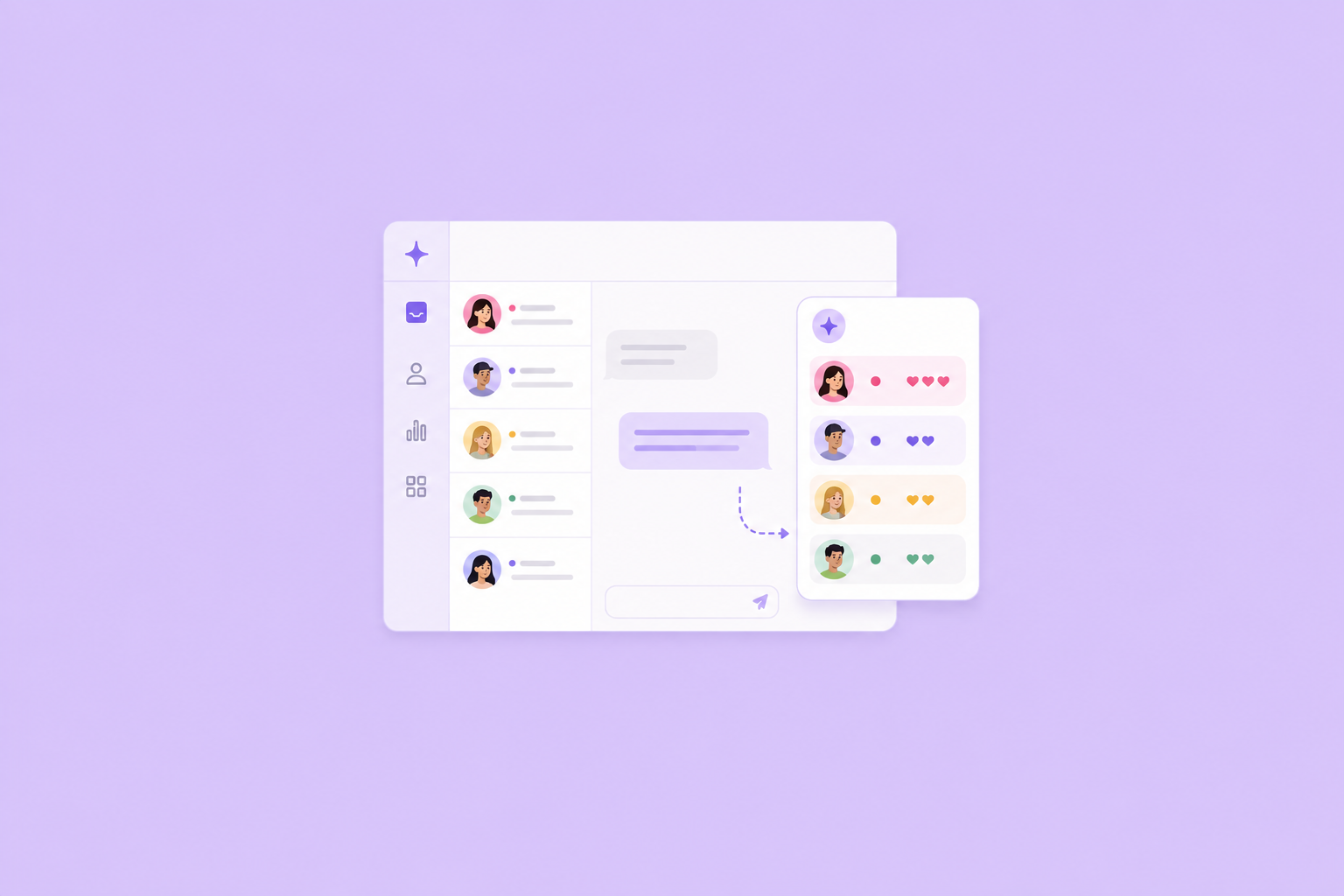
How to Use Supercreator’s Inbox Copilot to Focus on Fans Who Actually Buy
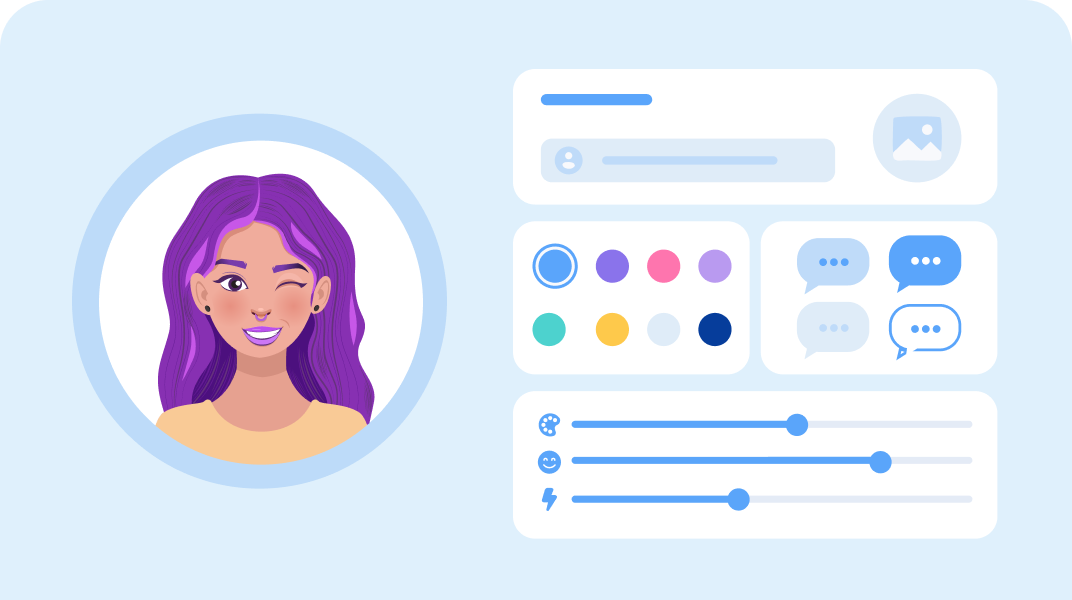
How to Customize an OnlyFans AI Chatbot to Match Your Brand Voice
Quick Answer: How Do You Grow on OnlyFans in 2026?
Growing on OnlyFans in 2026 comes down to a system built on three metrics: new subscriptions, earnings per subscriber, and churn. Creators who earn consistently are not making better content than everyone else. They have a profile that converts, they promote on the right platforms, they monetise beyond the subscription fee, and they use AI and automation to hold it all together at scale.
The growth system in short:
- Fix the profile first: clear bio, 15 to 20 posts live, hidden subscriber count, researched pricing
- Promote off-platform, because OnlyFans has no internal discovery. Reddit, Twitter/X, and Telegram move fastest
- Monetise with PPV, tips, and customs, not the subscription fee alone
- Cut churn with real engagement, since subscribers renew for connection, not content
- Layer in AI and automation to multiply a system that already works, never to replace one
Below is the full blueprint, metric by metric and platform by platform.
Key takeaways:
- Three numbers decide growth: daily new subscriptions (promotion), earnings per subscriber (monetisation), and churn (content and engagement). Each one points to a different fix.
- Never promote to a weak profile. Get the bio, 15 to 20 live posts, a hidden early subscriber count, and researched pricing in place first.
- OnlyFans has no internal discovery, so every subscriber comes from off-platform. Reddit, Twitter/X, and Telegram are the fastest free channels in 2026.
- Subscription fees are the floor. Real earnings per subscriber come from PPV, tips, and custom content.
- Subscribers renew for connection. Consistent posting plus genuine DM engagement is the difference between 5% and 2% monthly churn.
- AI and automation multiply a working system; they do not create one. Use them for volume DMs, welcome sequences, scheduling, and planning, and keep humans on strategy and high-value fans.
How to Grow Your OnlyFans: The Growth System Explained
Most creators who struggle on OnlyFans aren't struggling because their content is bad. They're struggling because they don't have a system. They post when they feel like it, promote on one platform, and treat every subscriber the same regardless of how much they spend or how close they are to churning.
The creators pulling consistent income have figured out three things: how to bring in new subscribers, how to get more money from each one, and how to keep them around. Everything else is just tactics in service of those three things. If you're just starting on OnlyFans, build this framework from day one rather than bolting it on later.
The Three Metrics That Drive OnlyFans Growth
Strip away all the noise, and OnlyFans growth comes down to three numbers:
- Daily new subscriptions tell you whether your promotion is working. If this number isn't growing, no amount of content quality will save you.
- Earnings per subscriber tell you how well you're monetizing the audience you already have. This is where PPV, tips, and custom content live. Most creators leave money on the table here because they rely entirely on subscription fees.
- Subscriber churn tells you how many people are leaving each month. A creator with 1,000 subscribers and 5% monthly churn loses 50 fans every month and has to replace them before growing. A creator with 2% churn is building something sustainable.
These three numbers tell you where your actual problem is. If new subscriptions are low, your promotion may need some work. If earnings per subscriber are low, your monetization strategy does. If churn is high, your content or engagement is the issue.
Before You Promote Anything, Get This Right
Driving traffic to a weak profile is a waste of every click. Before you push any promotion, make sure these are solid.
- Your bio needs to tell someone exactly what they're subscribing to without giving everything away. Clear enough that they know what to expect, specific enough that they're curious. Vague bios kill conversions.
- Have at least 15 to 20 pieces of content live before you start promoting. A new subscriber landing on a page with three posts will leave. Someone landing on a full, active feed has a reason to stay.
- Hide your subscriber count in the early stages. A low number signals low social proof and discourages new subscribers. Turn it off until you have enough that it works in your favor.
- Keep the text of your posts public so people can see what kind of content you post and how often. The content itself is locked, but the context around it should do selling work.
- Set your subscription price by researching what creators in your niche are charging. Too low signals low value. Too high reduces conversions on cold traffic.
Social Media Promotion by Platform
OnlyFans has no internal discovery. Every subscriber you get comes from somewhere else. Here's how each platform works in 2026.
X
Still the most creator-friendly mainstream platform for adult content. You can post explicit previews, link directly, and build a following without worrying about your account disappearing overnight. Post consistently, engage with followers, and use two-part posts where the second part (or the good stuff) is behind your OnlyFans link. Reply to posts in your niche within the first few minutes to catch algorithmic momentum.
68% of new creators say Reddit was their primary early traffic source. The reason is targeting. Subreddits are pre-sorted communities of people already interested in specific content types. Find three to five subreddits that fit your niche, post quality content consistently, and engage with the community rather than just dropping links. Accounts that only post promo get ignored. Accounts that actually participate convert.
Read more about how to grow your OnlyFans on Reddit
TikTok and Instagram
Both platforms restrict direct OnlyFans promotion and will ban accounts that push it too aggressively. Use these for personality and lifestyle content that builds curiosity, then funnel through a Linktree or landing page rather than a direct link. The goal is to make people want to find you, not to sell them on the spot.
YouTube
Growing in relevance as a traffic source in 2026. Behind-the-scenes content, creator lifestyle videos, and non-explicit teasers work well here. YouTube traffic converts well because subscribers have spent longer with you before they land on your page.
Telegram
Quietly one of the most effective paid promotion channels in 2026. Large Telegram channels in your niche sell shoutout slots, and their audiences are already warm and primed to spend. Building your own free Telegram channel as a funnel is also worth the investment early on. Unlike social media algorithms, every message reaches every subscriber.
Read more about how to grow your OnlyFans on Telegram
Snapchat
Still one of the strongest platforms for building loyal fans in 2026. Casual, behind-the-scenes updates, daily moments, and teaser content feel more personal than polished posts, helping build stronger connections over time. Snapchat works especially well because of its direct messaging and Stories, making it easier to turn engaged followers into paying subscribers without relying entirely on public algorithms.
Read more about how to grow your OnlyFans on Snapchat
How to Promote OnlyFans Anonymously
Privacy is a legitimate concern for a lot of creators, and it's entirely manageable with the right setup.
- Use a stage name consistently across every platform and keep it completely separate from anything tied to your real identity. The email address for your creator accounts should be new, not linked to personal accounts, and not synced to your phone contacts.
- Run at least two sets of social accounts: one for safe-for-work discovery platforms like Instagram and TikTok, and one for explicit promo on Twitter and Reddit. This reduces ban risk on the restricted platforms while letting you go further on the permissive ones.
- If local recognition is a concern, consider targeting international audiences early. Collaborating with creators in other countries and posting in English or Spanish opens up markets where your proximity circle is simply irrelevant.
- OnlyFans lets you geo-block specific regions. If there are places you specifically don't want finding your page, use it.
Collaborations and Shoutouts
Collabs are one of the fastest ways to reach new subscribers who are already in your audience's demographic.
For creator-to-creator collabs, find creators with similar subscriber counts and overlapping niches. The value exchange should feel equal on both sides. Joint content, reciprocal shoutouts, and co-hosted live streams all work. The key is finding someone whose audience would genuinely be interested in your content, not just someone with more followers than you.
Paid shoutouts from larger accounts can work but require vetting. Check that the account has real engagement before paying. Fake follower counts are common, and a shoutout from a 50k account with no real engagement will return nothing.
OnlyFans has a built-in referral program that most creators ignore. Offering existing subscribers a small incentive like a discount or free content unlock for referring a paying friend is one of the lowest-cost acquisition methods available.
Paid Promotion and Adult Ad Networks
Standard paid advertising on Google, Instagram, and Facebook does not work for OnlyFans. Direct links to adult subscription content get ads rejected and accounts suspended. This is not a workaround problem. It is how these platforms operate.
What does work is using a compliant landing page as the intermediary. Instead of sending ad traffic straight to your OnlyFans page, you send it to a landing page that complies with the platform's content rules and then routes interested visitors to your profile. This adds a step but keeps your ad accounts safe.
Adult traffic networks are the more direct paid route. These platforms specialize in adult content advertising and offer push notifications, banner ads, and pop-up formats with no content restrictions.
Read more about adult ad networks here
PPV Strategy and Earnings Per Subscriber
Most creators with low earnings per subscriber are under-using PPV. Subscription fees are the floor, not the ceiling.
Your best content should not go in the subscription feed. It should go in PPV. Post teasers on your main feed that build anticipation, then release the full version as a paid unlock. Keep PPV pricing consistent enough that subscribers trust the value, but test higher prices on clearly high-demand content.
Read more about how to make a PPV post on OnlyFans here
An OnlyFans CRM, like Supercreator, makes this practical at scale. When your subscriber list grows past a few hundred, tracking who opened what, who spent last month versus who hasn't in three months, and who is close to churning becomes impossible to manage manually.
Fan Engagement and Retention
Subscribers renew for connection, not content. You can have the best photos on the platform and still have high churn if fans feel like they're buying from a vending machine rather than following someone they actually like.
The basics: respond to DMs, acknowledge your regulars, ask for content feedback, and run polls on what fans want next. These are not optional extras. They are what separates a 5% monthly churn from a 2% one, and that difference compounds into a significant revenue gap over six months.
As your subscriber base grows, keeping up with DMs manually becomes unsustainable. An OnlyFans AI chatbot keeps the conversation going at volume without every message requiring your personal attention. The distinction matters: automation handles the repetitive interactions, but the strategy and high-value conversations still need a human.
Similarly, an OnlyFans bot can manage welcome sequences, re-engagement messages, and renewal reminders automatically, so these touchpoints happen consistently regardless of how busy your posting schedule gets.
AI and Automation in Your Growth Workflow
AI tools have changed what's possible for creators managing their accounts without a team.
For content planning, tools like ChatGPT help structure content calendars, script mass-message sequences, and brainstorm PPV campaign ideas. They don't replace the content itself, but they remove the planning bottleneck.
For social media, scheduling tools like Buffer and Later keep your promotional presence consistent across platforms without requiring you to post manually every day. Set the schedule once and let it run.
For fan communication, AI chatbot tools handle the DM volume that would otherwise eat your entire day. The more subscribers you have, the more this matters.
Automation does not replace the need for strategy. It multiplies the impact of a strategy that already works. If your content isn't converting and your promotion isn't driving new subscribers, no amount of automation will fix that.
Analytics and Tracking
You cannot improve what you don't measure. Creators who scale consistently track which content converts, where subscribers come from, which PPVs underperform, and when churn tends to spike.
OnlyFans provides basic analytics natively. For deeper subscriber behavior tracking, spending pattern analysis, and cross-platform traffic attribution, third-party OnlyFans analytics tools, like Superceator, give you the data layer needed to make decisions rather than guesses.
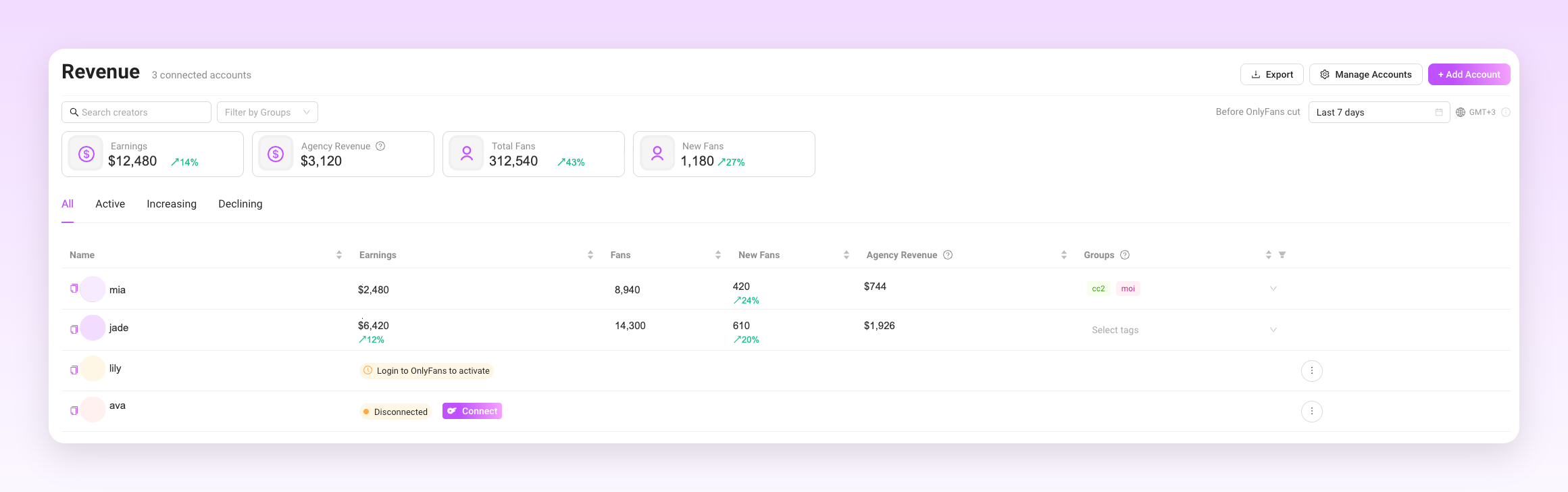
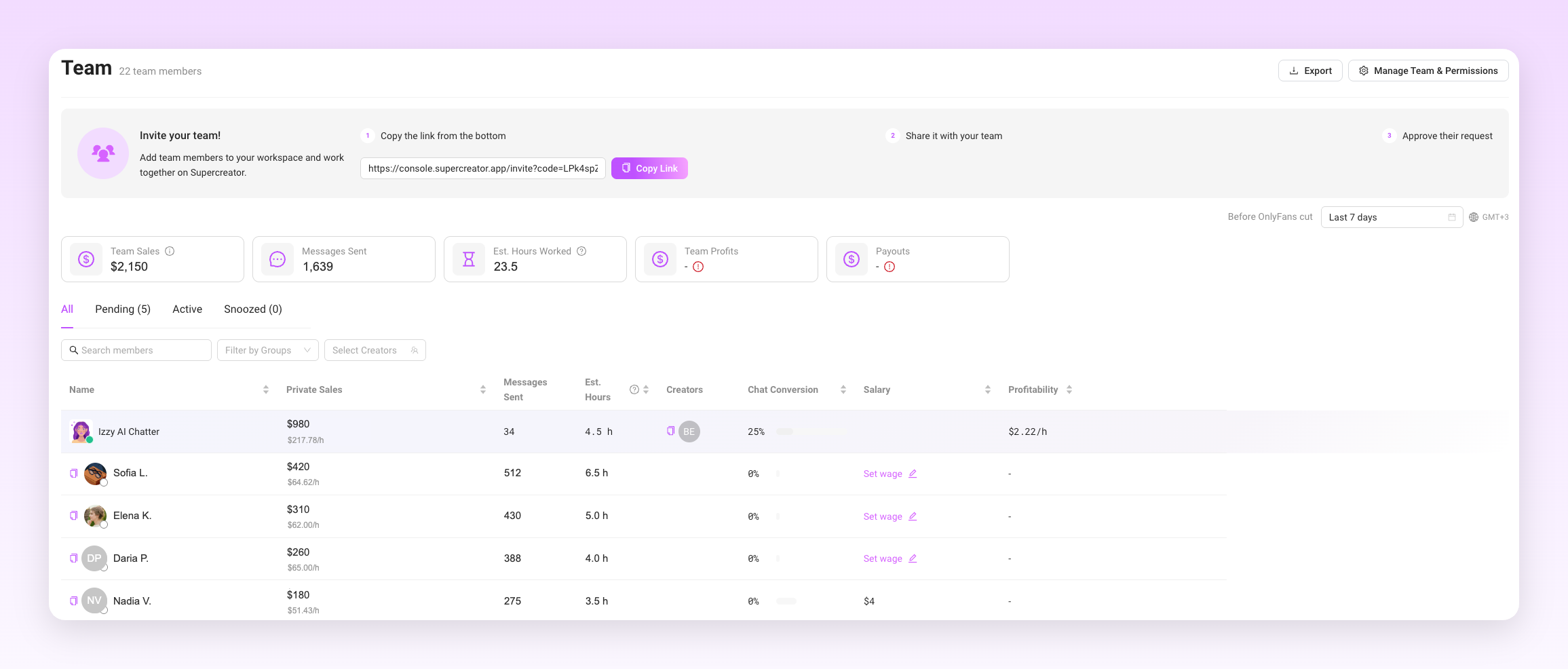
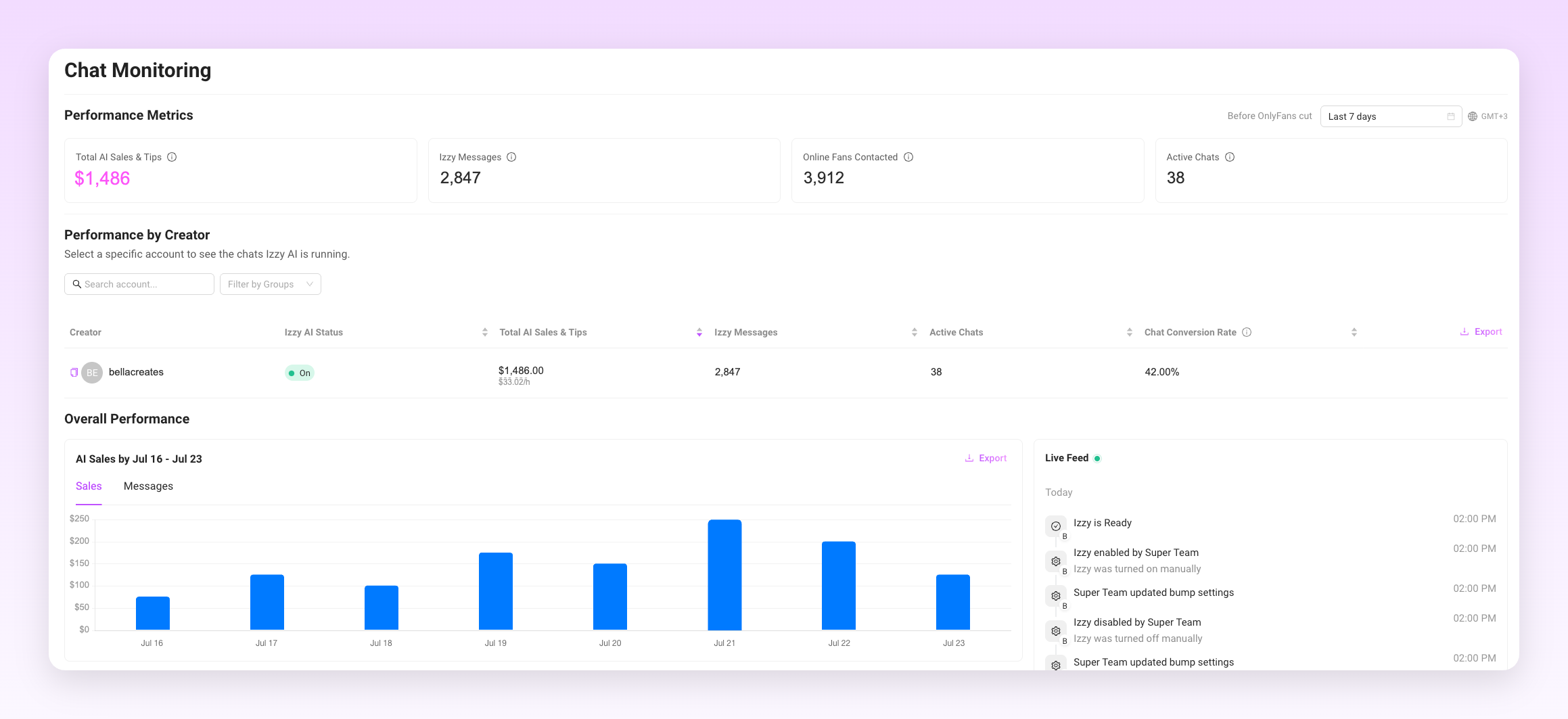
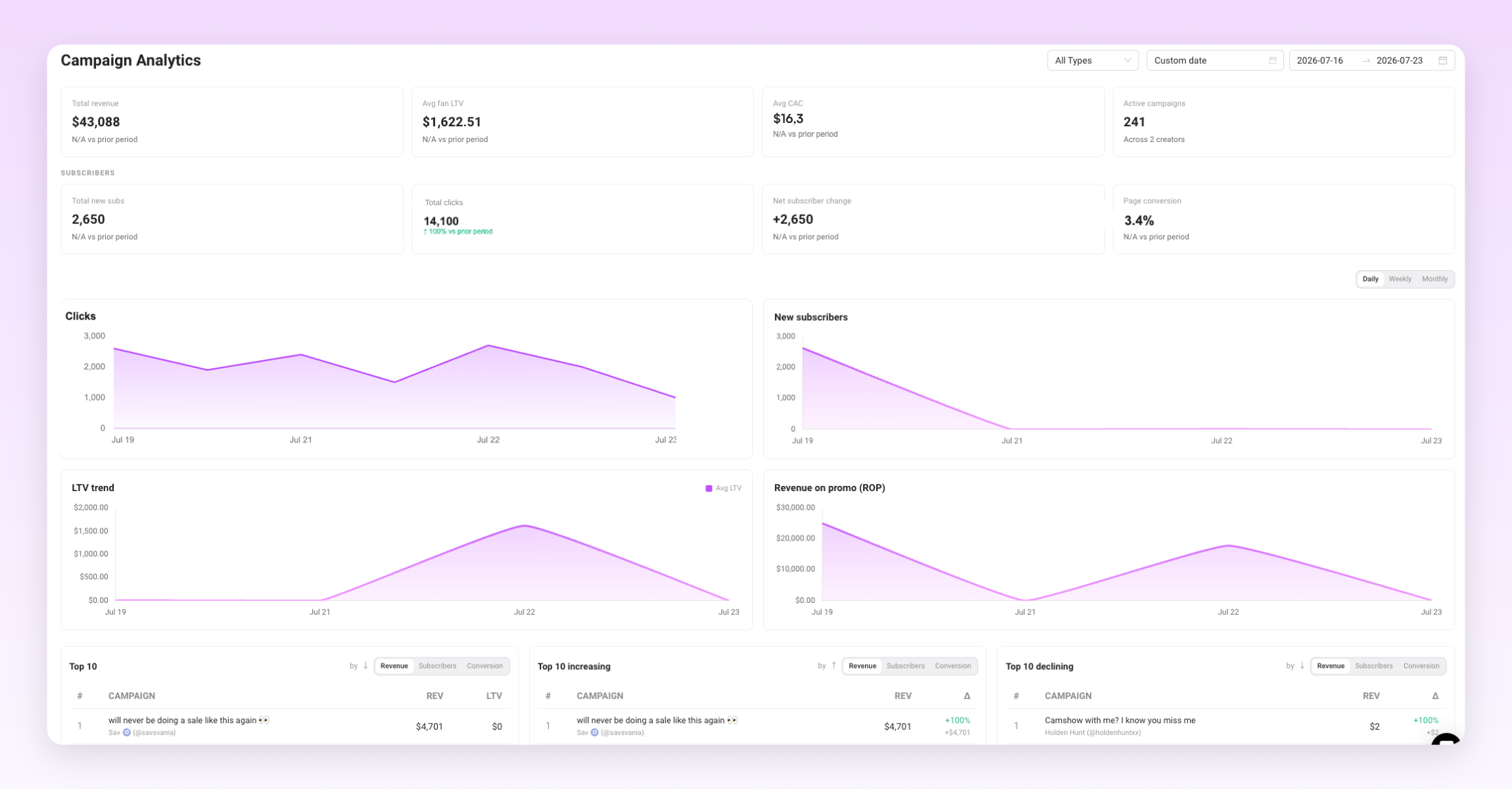
Run a monthly review on these numbers at minimum: new subscribers, churn rate, earnings per subscriber, and your top five performing posts. The patterns that emerge will tell you more about your strategy than any outside advice.
Growing Your OnlyFans Needs a System
The creators earning consistently in 2026 are not doing anything magical. They have a profile that converts, they show up on the right platforms, they monetize through multiple revenue streams, and they keep fans around through genuine engagement.
Build the system first. Optimize each part as you learn what works for your specific niche and audience. The platform rewards consistency and strategy more than any single viral moment.
How to Grow Your OnlyFans in 2026: The AI & Automation Blueprint
Quick Answer: Are OnlyFans Bots Safe to Use?
OnlyFans bots are safe to use only when they assist a real human creator rather than replace one. The platform allows automation that helps you work faster, and bans automation that deceives fans or bypasses its native system. Get that distinction right and a bot protects your revenue instead of risking your account.
What keeps a bot-assisted account compliant in 2026:
- Use tools that run inside the native OnlyFans interface, not scrapers or credential-harvesting extensions
- Keep a human in every conversation that matters, especially your top spenders
- Segment before you send, so automated messages never look like spam blasts
- Disclose AI with #AI or #AIGenerated wherever it substantially writes your content
- Keep every transaction on-platform, with no redirects to CashApp or crypto
Get any of these wrong, and you risk warnings, restrictions, and eventually a permanent ban with earnings forfeited. Read our guide below to discover exactly what OnlyFans bans, what it permits, and how to set up automation that stays on the right side of the line.
Key takeaways:
- OnlyFans allows automation that assists a real creator and bans automation that replaces one. That single distinction decides whether a bot protects your account or gets it banned.
- Banned outright: third-party scraper bots, unvetted extensions that bypass the native interface, fully automated AI personas with no human oversight, and any tool that redirects fans to off-platform payment.
- Permitted: assisted messaging, welcome sequences, inactivity-triggered re-engagement, and content scheduling, as long as a human stays in control.
- Segment your subscribers before automating, and keep top spenders in manual conversations. Identical mass DMs read as spam to moderation systems.
- Disclose AI with #AI or #AIGenerated wherever it substantially writes your content. Undisclosed AI also drives chargebacks, which are a separate account risk.
- Enforcement escalates: automated flag, warning, restrictions, then a permanent ban with earnings forfeited on repeat violations.
Using OnlyFans Bots Safely: The Full Guide
OnlyFans allows automation. It does not allow all automation. The distinction matters because creators who blur that line tend to find out where it is only after their account has been permanently banned.
This article covers what the platform actually prohibits, what falls within the rules, and how to set up compliant automation without putting your account at risk.
What OnlyFans Bots Are Banned (and Why)
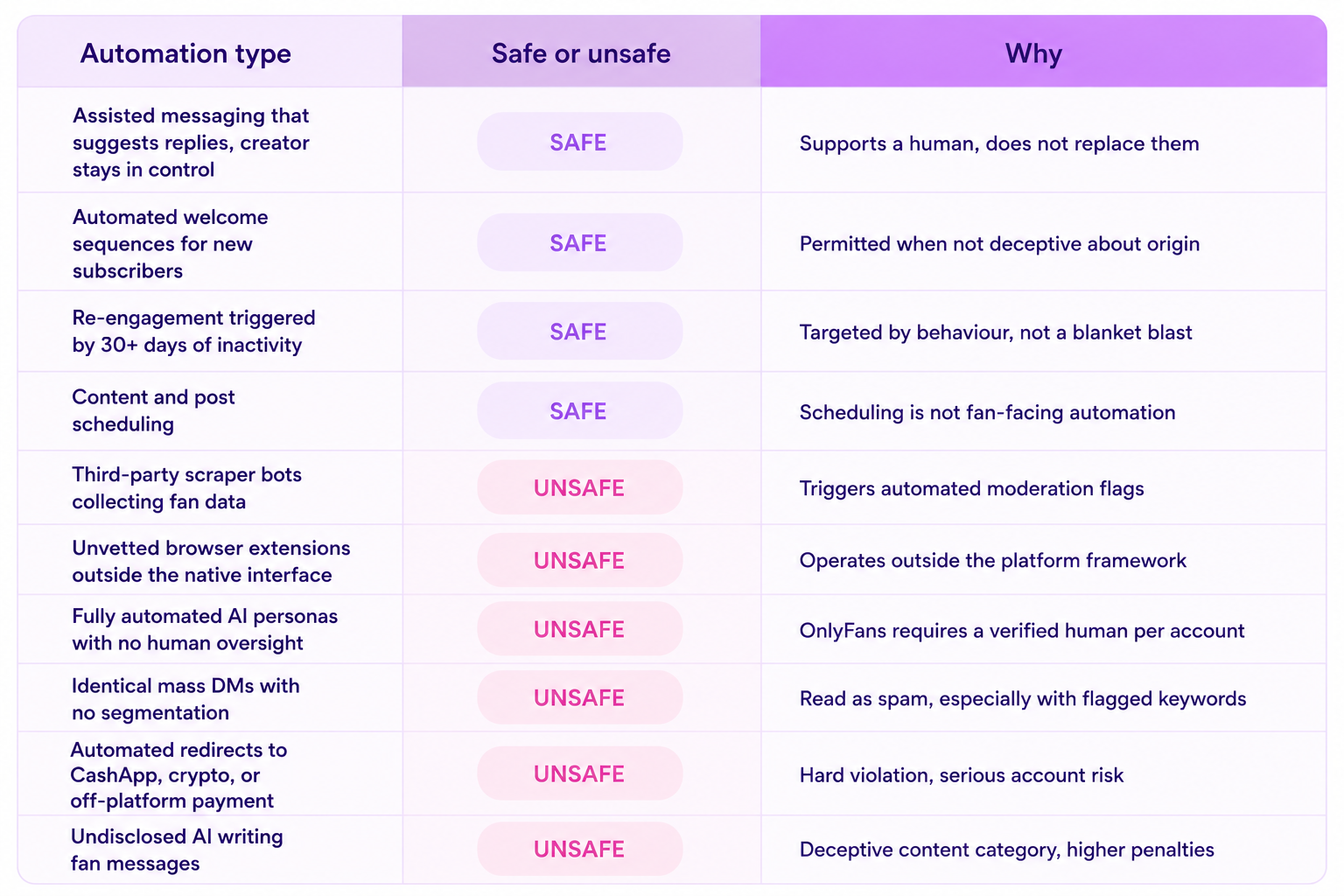
The platform prohibits automation that deceives fans or bypasses the native system. Specifically:
- Third-party scraper bots that mass-collect fan data or simulate human behavior to trigger engagement are banned. These tools set off automated moderation flags because the activity patterns look nothing like a real creator.
- Unvetted browser extensions that operate outside the platform's framework and attempt to access account data or send messages through unofficial channels are prohibited. If the tool is not operating within the native interface, it is likely in violation.
- Fully automated AI personas that replace a real creator entirely and interact with fans without any human oversight are not permitted. OnlyFans requires a verified human behind every account. You cannot run a page where an AI is the only entity communicating with subscribers with no human involved.
- External payment redirects pushed through automated messages are a hard violation. Any tool configured to send fans to CashApp, crypto, or any payment method outside the platform puts the account at serious risk.
- Identical mass DMs sent to large subscriber lists without personalization or segmentation are treated as spam behavior. The content of those messages matters too. Flagged keywords in automated scripts can trigger moderation faster than manual messages would.
Which OnlyFans Bots Are Allowed?
The line OnlyFans draws is between deceptive automation and assisted automation. Tools that help a real human creator work more efficiently are generally within the rules. Tools that remove the human from the equation are not.
Compliant automation can include:
- Assisted messaging tools that surface fan context, suggest responses, and help creators reply faster while keeping the creator in control of the conversation. The AI supports the workflow rather than running it independently.
- Welcome message sequences sent to new subscribers when they join. These can be automated as long as they are not deceptive about their origin when AI is assisting.
- Re-engagement messages to inactive subscribers triggered by inactivity, not by a spam script. The timing and targeting need to be specific rather than blanket.
- Content scheduling for posts across the platform. Scheduling is not the same as automation that interacts with fans.
- AI disclosure is required when AI assists with generating text responses or content. Using #AI or #AIGenerated in captions is the standard approach. As of 2026, OnlyFans has been tightening disclosure expectations alongside broader regulatory pressure from the EU AI Act and US state-level legislation.
Safe vs. Unsafe Automation at a Glance
How to Use an OnlyFans Bot Without Violating Terms
The practical setup for compliant automation comes down to tool selection, configuration, and how you handle different tiers of subscribers.
- Choose tools that operate inside the platform framework. Software that integrates with the native OnlyFans interface rather than trying to bypass it is where the safety line sits. An OnlyFans bot built to work within platform guidelines handles welcome sequences, re-engagement, and follow-ups without triggering the suspicious activity patterns that flag moderation systems.
- Segment your subscribers before automating anything. Sending the same automated message to every subscriber regardless of their spending history or engagement level is both ineffective and risky. Fan segmentation lets you send targeted, relevant messages to specific groups rather than blasting everyone at once.
- Keep your top spenders in manual conversations. Automation handles volume. Your highest-value subscribers, the ones tipping regularly and purchasing PPV consistently, expect a level of personalization that automated messages do not deliver. Handing those conversations to a real chatter or the creator directly is not just good for relationships; it is how you protect the revenue those fans represent.
- Write automation scripts in your own voice. Generic automated messages read like automated messages. Fans notice. The more your scheduled sequences match how you actually write, the less friction there is between the automated touchpoints and the real conversations.
An OnlyFans AI chatbot that learns your tone and surfaces fan context before each reply keeps the conversation feeling personal even when the volume is high. The tool supports the creator rather than replacing them, which is the framework that stays within platform guidelines.
Managing Fan Tiers with Automation
Not every subscriber should receive the same type of automated engagement. Treating them as one group is both a compliance risk and a revenue leak.
- New subscribers are the right audience for automated welcome sequences. A personalized welcome message that triggers when someone joins, introduces what they can expect, and includes a low-friction first offer is compliant and effective.
- Inactive subscribers who have not engaged in 30 days or more are a good target for re-engagement automation. A triggered message based on inactivity, rather than a scheduled blast, keeps the approach targeted rather than spam-like.
- High-value fans should come out of the automated pipeline and into direct human interaction as soon as their spending patterns identify them. An OnlyFans CRM that tracks spend, purchase history, and engagement makes it easy to identify who crosses that threshold and flag them for personal attention.
- Cold subscribers who have never purchased should receive different messaging than active buyers. Segmenting by behavior means your automation is doing actual conversion work rather than creating noise.
The AI Disclosure Requirement
This is the part most creators underestimate. OnlyFans has been moving toward stricter AI disclosure expectations, and the broader regulatory environment in 2026 is pushing platforms to enforce this more consistently.
If AI is generating or substantially assisting with the text in your messages, that needs to be disclosed. The standard approach is including #AI or #AIGenerated in the relevant content. Doing this proactively protects the account from the "deceptive content" violation category, which carries higher penalties than most other policy breaches.
Disclosure is not just a compliance checkbox. Fans who discover undisclosed AI interactions tend to file chargebacks. Chargeback rates are something OnlyFans monitors at the account level. A pattern of chargebacks can trigger a review independent of any specific content violation.
What Happens When an OnlyFans Bot Breaks the Rules?
The enforcement pattern on OnlyFans for bot violations follows a predictable escalation: automated moderation flags the behavior, the account receives a warning or content removal, repeated violations lead to restrictions, and a third serious violation typically results in a permanent ban with earnings forfeited.
The automated moderation systems are pattern-based. Activity that looks inconsistent with how a real creator operates, such as messages sent at precise intervals around the clock, identical content sent to hundreds of fans in minutes, or login patterns that suggest multiple users sharing one account without proper tools, triggers review faster than most creators expect.
The other risk that comes up less often is chargeback exposure. When fans feel deceived by automation they were not told about, they dispute the charges. A high chargeback rate puts the account in a different kind of jeopardy than a content violation, and it is harder to appeal.
Automation That Works and Keeps the Account
The creators running the most efficient automated setups have one thing in common: they treat automation as infrastructure for a real human operation, not as a replacement for one. The bot handles the volume. The creator or chatter handles the relationships.
That framework is also what keeps accounts safe. OnlyFans can distinguish between a creator using tools to manage their workload and a creator who has handed their account to software entirely. The former is allowed. The latter is not.
Set up automation to do the repetitive work. Keep humans in the conversations that matter. Disclose where required. Those three things cover most of what keeps a bot-assisted account within the platform's rules.
OnlyFans Bots: How to Use Them Safely Without Getting Banned
Anyone Can Make a Bot Chat. Almost No One Can Make It Chat Like You, Every Time
It Works on Your Laptop. Would It Survive 100 Million Messages a Month?
Sounding Right Isn't Enough. It Also Has to Keep You Off OnlyFans' Radar

For creators, choosing an agency can still mean navigating aggressive contracts, unclear expectations, privacy concerns, and hard-to-verify promises. Aruna Talent was built around a different idea: what if an agency designed its business around what puts a creator in a stronger long-term position?
Founded in 2022 by two operators who came from e-commerce and forex, Aruna entered the creator economy without being tied to the industry's existing way of doing things. From the outside, its founders saw an industry that often prioritized short-term revenue over creator ownership, security, and longevity.
“Aruna was built to prove it works better run the other way. Not as a moral position, as a commercial bet.”
Four years and more than 60 managed creators later, that idea still shapes how Aruna approaches everything from hiring and creator selection to privacy, contracts, technology, and offboarding.
Building the Agency Backwards
One of Aruna's first challenges was standing out in an industry where almost every agency seemed to make the same promises.
In 2022, creators were already surrounded by agencies promising growth, transparency, and support. From a website or sales call alone, it was difficult to know which claims would translate into the experience of working together.
Aruna's response was to focus less on making claims and more on building systems that could support them.
Over time, that meant staffing functions many agencies might consider overhead: content protection, messaging quality assurance, account security, identity separation, audience growth, and creator wellbeing.
These departments don't necessarily generate revenue directly. But for Aruna, that's not the point. The agency sees them as part of the infrastructure that keeps creators protected, supported, and willing to stay for the long term.
That focus on retention eventually became central to the business. Instead of asking only how much an account could earn this month, Aruna began asking what the creator would still have after months or years of working together.
What 300+ Creator Consultations Taught Aruna
One of Aruna's biggest changes came from something surprisingly simple: listening to its own calls.
The agency records consultations with consent for training and quality review. Once it had accumulated enough conversations, the team began analyzing them systematically instead of relying on assumptions about what creators cared about.
The results challenged one of the industry's most common beliefs.
After analyzing more than 300 consultations, Aruna found that privacy, family, and fear of recognition appeared in 91% of conversations. Contract terms and concerns about eventually leaving appeared in 87%.
Revenue split, one of the first things many agencies focus on, appeared in just 48%.
“The industry has spent a decade perfecting its answer to a question women aren't asking.”
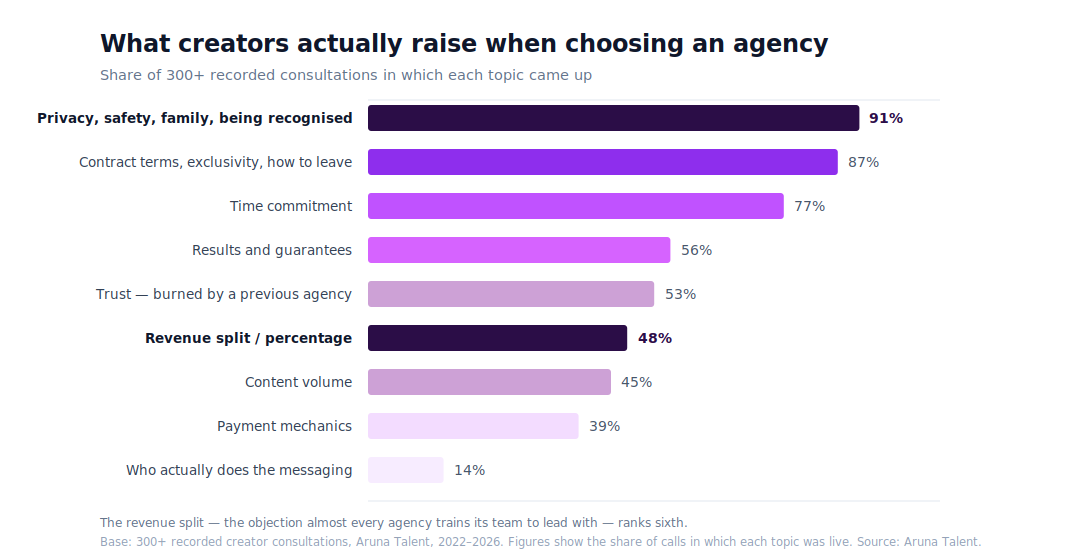
That discovery changed Aruna's consultation process. Today, a typical first call lasts around 30 minutes and focuses heavily on listening. Questions about privacy and about what happens if a creator wants to stop come early in the conversation, rather than being buried behind revenue projections.
It also changed how the agency approaches sales.
Aruna's acquisition team doesn't have the authority to sign a creator on the spot. They qualify the applicant, document the conversation, and the wider team decides whether the partnership makes sense.
The acquisition team is measured on the quality of its recommendations rather than simply the number of creators signed. Terms aren't individually negotiated either: Aruna says everyone is offered the same arrangement.
For the agency, the people deciding who joins should ultimately be accountable for whether the team can deliver for that creator.
Privacy Is Infrastructure, Not a Promise
The consultation data also reinforced something Aruna had already begun investing heavily in: privacy.
For many creators, the biggest concern isn't whether an account can grow. It's whether that growth can happen without exposing their legal identity to family, employers, or people in their everyday lives.
Aruna treats that as an operational problem rather than a reassurance given during a sales call.
Before a creator's first post goes live, the agency works on persona architecture, geo-blocking, account security, and identity separation. It also operates content protection and DMCA monitoring across more than 500 sites.
The goal is to think about exposure before it happens rather than only respond after something has leaked.
That approach extends to copyright takedowns. Aruna specifically avoids putting a creator's legal name into takedown filings, since information submitted through these processes can potentially become publicly accessible.
Across more than four years and 60+ managed creators, Aruna reports zero identity leaks.
It's the kind of work that doesn't necessarily show up on a revenue dashboard, but for an agency whose own data says privacy is one of creators' biggest concerns, it's a core part of what management is supposed to provide.
Who Aruna Is and Isn't Built For
Aruna no longer describes itself simply as a management company. Instead, it sees the relationship as a consulting partnership.
That distinction matters because the agency expects creators to remain active participants in their own growth.
The biggest quality Aruna looks for isn't an existing following, previous OnlyFans experience, or already-high revenue. It's conviction.
“We would rather back a woman with no following, no experience, and no advantages who intends to work than a promising one who's undecided.”
In fact, the majority of women applying to Aruna are either pre-revenue or earning under $5,000 per month.
What matters more is whether they're prepared to treat the work seriously.
Aruna considers the first 90 days particularly important. Ideally, creators put in around 30 hours during their first week, where their schedule allows, followed by roughly 20 hours per week afterward. According to the agency, the creators who front-load that early period are more likely to still be earning well two years later.
That selectivity also means Aruna says no.
Applicants already under contract with another agency are automatically declined. And if a creator's boundaries don't fit Aruna's model, the agency says it would rather refer her elsewhere than persuade her into an arrangement she isn't comfortable with.
The goal isn't to sign everyone who could potentially generate revenue. It's to build partnerships that both sides believe can actually last.
Building an Agency Creators Can Leave
Perhaps the clearest example of Aruna's philosophy is how it handles something most agencies would rather not focus on: leaving.
Either side can end the agreement with 30 days' written notice. According to Aruna, there is no exit fee or financial penalty for doing so.
When a creator leaves, administrative control of her OnlyFans account returns to her, along with her content and performance history. Subscribers remain with the account, meaning the audience and recurring income she spent time building don't disappear simply because the agency relationship ends.
Final earnings are settled, handles are rebranded, and infrastructure is handed back.
“Everything an agency believes about a creator shows up in how it behaves when she stops being profitable to it.”
Aruna says creators who previously left have even returned later with their accounts intact, something the agency sees as possible only when leaving isn't treated as a betrayal.
This is also why Aruna recommends creators ask about exit terms before getting caught up in commission percentages.
The split determines what you earn while you're with an agency. The exit determines what you still control when the relationship ends.
Technology Without Removing the Human
Behind the scenes, Aruna has grown into a distributed team of more than 100 people, supported by centralized communication, internal dashboards, and systems that keep creator information accessible across the team.
AI has become an important part of that infrastructure. Internally, Aruna uses it to analyze consultations and meetings, support content protection, qualify applications, automate financial reporting, and power internal tools.
On the fan-facing side, the approach is more deliberate. Documented voice standards and quality assurance help keep each creator's messaging consistent across chatters and shifts. AI supports the team by reducing repetitive work, surfacing important fans, and maintaining consistency rather than replacing human judgment.
For agencies building a similar system, Aruna points to Supercreator as a way to support that workflow. Supercreator combines AI-assisted chatting and creator-approved customization with a CRM, inbox, automations, follow-ups, and mass messaging tools designed for creator teams.
For Aruna, AI works best as leverage for a well-trained team, not as a substitute for one.
Success Isn't Just What a Creator Earns
Another part of Aruna's model starts after the money comes in.
Creators entering the industry may suddenly find themselves earning significantly more than they have before, often without an employer withholding taxes or providing the financial structure that comes with traditional employment.
Making money and keeping it are two different skills.
That's why Aruna includes financial education around taxes, bookkeeping, what creators should set aside, and how they can think about the money they're earning beyond their next payout.
The agency also brings in outside confidence and mindset coaching to support creators with the psychological side of working in an industry that still carries significant stigma.
For Aruna, a successful creator isn't simply someone who has a strong month.
The longer-term goal is for her to leave the experience with something durable: money, financial knowledge, an audience, confidence, or a business she still controls, whether she's still creating content three years from now or not.
Where Creator Management Goes Next
Aruna expects AI to reshape the creator economy, but not necessarily by replacing everyone currently doing the work.
Instead, the agency expects chatting to become increasingly automated. Routine and mechanical tasks can be handled by technology, allowing trained teams to spend more time on conversations, decisions, and fans that actually require human judgment.
At the same time, that creates a bigger challenge for agencies.
If AI makes competent basic execution inexpensive, simply offering to post content and reply to fans won't be enough to justify a management fee.
The things that become more valuable are the ones that are harder to automate: judgment, protection, relationships, strategy, and accountability when something goes wrong.
Aruna also expects synthetic performers to become a meaningful part of the creator economy and sees diversification beyond a single platform as increasingly important.
But one of the trends the team is most optimistic about is the professionalization of creator management itself.
More agencies are developing real quality assurance, training, financial controls, security processes, and operational standards. At the same time, creators are becoming better informed about what they should expect from the businesses representing them.
That makes it harder to compete on promises alone.
What Creators Should Ask Before Signing With an Agency
For creators considering management, Aruna's first piece of advice is simple:
“Ask about the exit first, not the split.”
Before discussing percentages, ask what happens on the day you want to leave. How much notice is required? Is there an exit fee? Who controls the account? What happens to your content, subscribers, data, and earnings?
Then ask the agency what it turns down. Any agency can explain who it wants to sign. An agency with clear standards should also be able to explain who it won't sign and why.
Ask who actually messages your fans and whether the agency gives you a straightforward answer.
Ask specifically how your identity is protected, not simply whether the agency “takes privacy seriously,” but what systems are actually in place.
And be skeptical of guaranteed earnings. An agency can provide strategy, infrastructure, traffic, messaging, and expertise, but the creator herself remains one of the biggest variables in the result.
Final Thoughts
Aruna Talent’s creator-first approach goes beyond positioning. It shows up in how the agency measures creator concerns, invests in privacy and well-being, chooses who it works with, and handles the end of a partnership.
The philosophy is simple: measure what you claim and build systems that prove it.
For creators considering working with an agency, Aruna encourages asking the hard questions upfront — about privacy, contracts, expectations, and what happens if you leave.
In practice, Aruna Talent is a creator consulting partnership founded in 2022, working with a women-only roster on OnlyFans and adjacent platforms. The agency staffs identity protection, content takedowns, messaging quality assurance, and creator wellbeing as internal functions.
If you’re weighing your options, you can apply to Aruna Talent for a 30-minute, no-pressure conversation and honest numbers, whether or not the agency is the right fit.
Aruna Talent: A Different Approach to OnlyFans Management
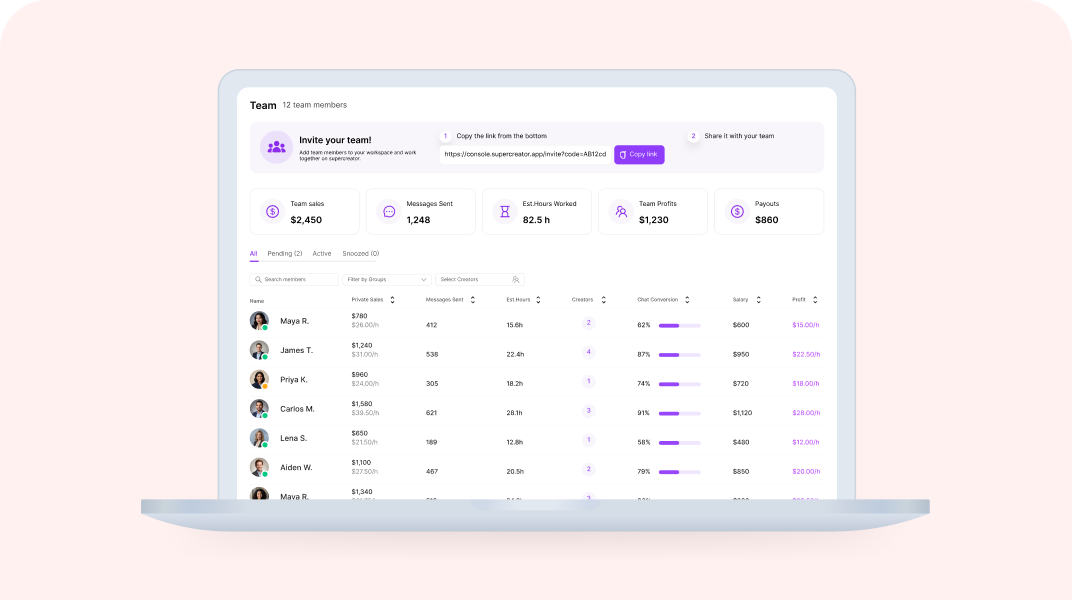
Quick Answer: How Do You Onboard a Chatter in Supercreator?
Onboarding a new chatter in Supercreator takes seven days, moving from access and orientation to independent work on live accounts. The agency sets up accounts and permissions first, then the chatter learns the fan data, calibrates to the creator's voice, and starts on low-value fans before handling PPV and full shifts. Rushing this is the fastest way to create problems that take weeks to fix.
The seven-day path in short:
- Before day 1: admin adds accounts to the Console, sets role-based permissions, sends the invite
- Days 1 to 2: access, orientation, and learning the fan data layer
- Day 3: voice and tone calibration against the creator's best messages
- Days 4 to 5: first live messages on low-value fans, then PPV and upsell training
- Days 6 to 7: independent shift with monitoring, then a structured review and sign-off
Onboarding your next chatter? Set up their permissions in the Console before you send the invite.
Key takeaways:
- Get the agency side ready first: add each OnlyFans account to the Console, set role-based permissions per chatter, then send the invite. Chatters never see login credentials.
- Days 1 to 2 are for orientation and reading the fan data layer in the CRM, not messaging. Do not put a chatter on a live account on day one.
- Day 3 is voice calibration. Have them draft ten sample replies against the creator's best-converting messages before anything goes live.
- Days 4 to 5 introduce live messaging on low-value fans, then PPV and upsell mechanics. Keep mass messaging supervised.
- Day 6 is a monitored independent shift; day 7 is a structured review and week-two scope, not another shift.
- Set benchmarks before go-live: response time under 15 to 20 minutes, message quality over volume, and PPV conversion tracked per chatter, per account, per week.
The 7-Day Chatter Onboarding Framework
Bringing a new chatter into an OnlyFans agency is where operations can quietly fall apart. The tools are set up, the accounts are connected, but nobody documented what the chatter is actually supposed to do on day one. They start cold, make avoidable mistakes, and the agency spends the next two weeks cleaning up instead of scaling.
Let’s walk through a day-by-day framework for onboarding a new chatter through Supercreator in seven days, from first access to working independently on live accounts.
Before Day 1: What the Admin Needs to Do First
The chatter cannot do anything until the agency side is ready. Before you send anyone an invite link, make sure these are in place.
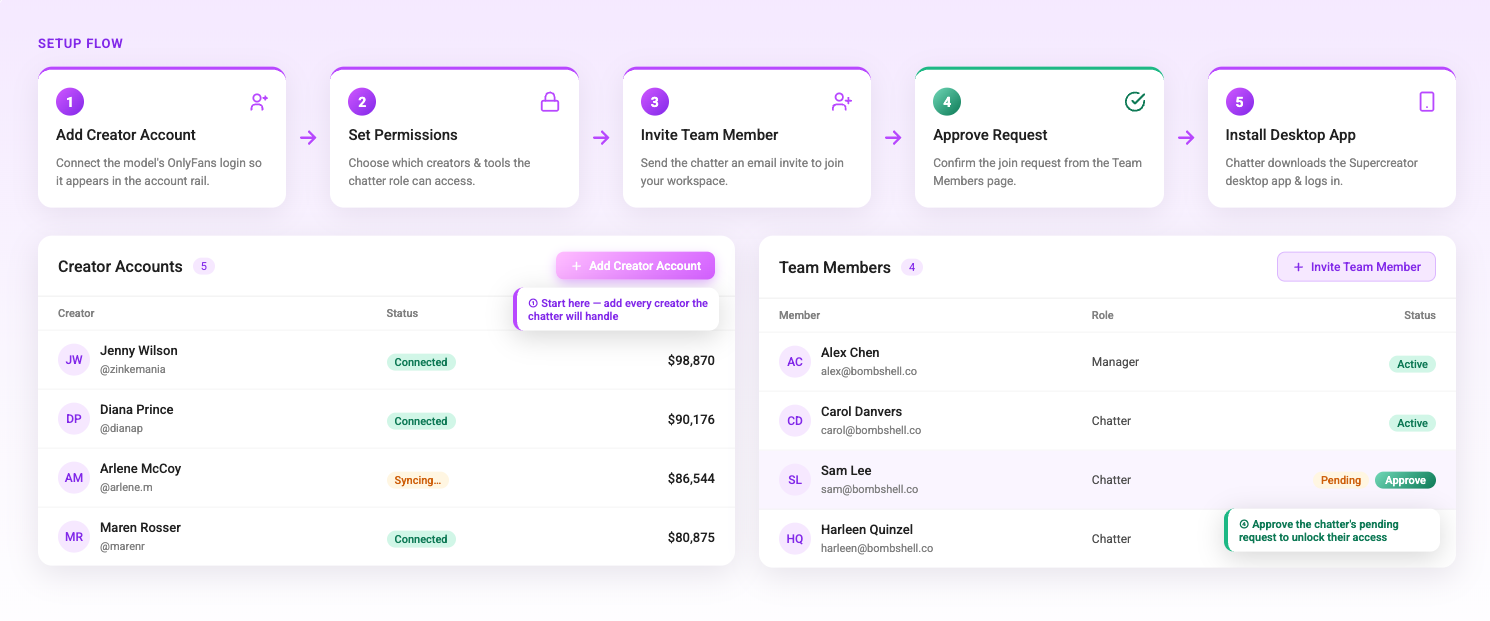
Every OnlyFans account the chatter will work on needs to be added to the Supercreator Console individually. Each account requires its own login and password — you cannot switch between accounts within the same OnlyFans profile using the Desktop app. Log in to each account through the Supercreator app, go to the Accounts section, enter the OnlyFans username, and click Add Account. The account needs to show as Connected before anyone else can access it.
Once accounts are added, set the permissions for that chatter before you send the invite. Decide which accounts they have access to, what actions they can take, and what they cannot touch. Supercreator has role-based permissions, so locking this down before the chatter joins means they land in a controlled environment, not a wide-open one.
Then send the invite link. The chatter signs up with their email or Google account, and you approve their request from the Team Members page. One license per OnlyFans creator. Unlimited chatters can be connected to the same account.
Day 1: Access and Orientation
The chatter receives the invite link, creates their account, and installs the Supercreator Desktop app. They need to sign in using the same email address associated with their Supercreator account in your workspace. This is a common point of confusion that is worth flagging explicitly before they start.
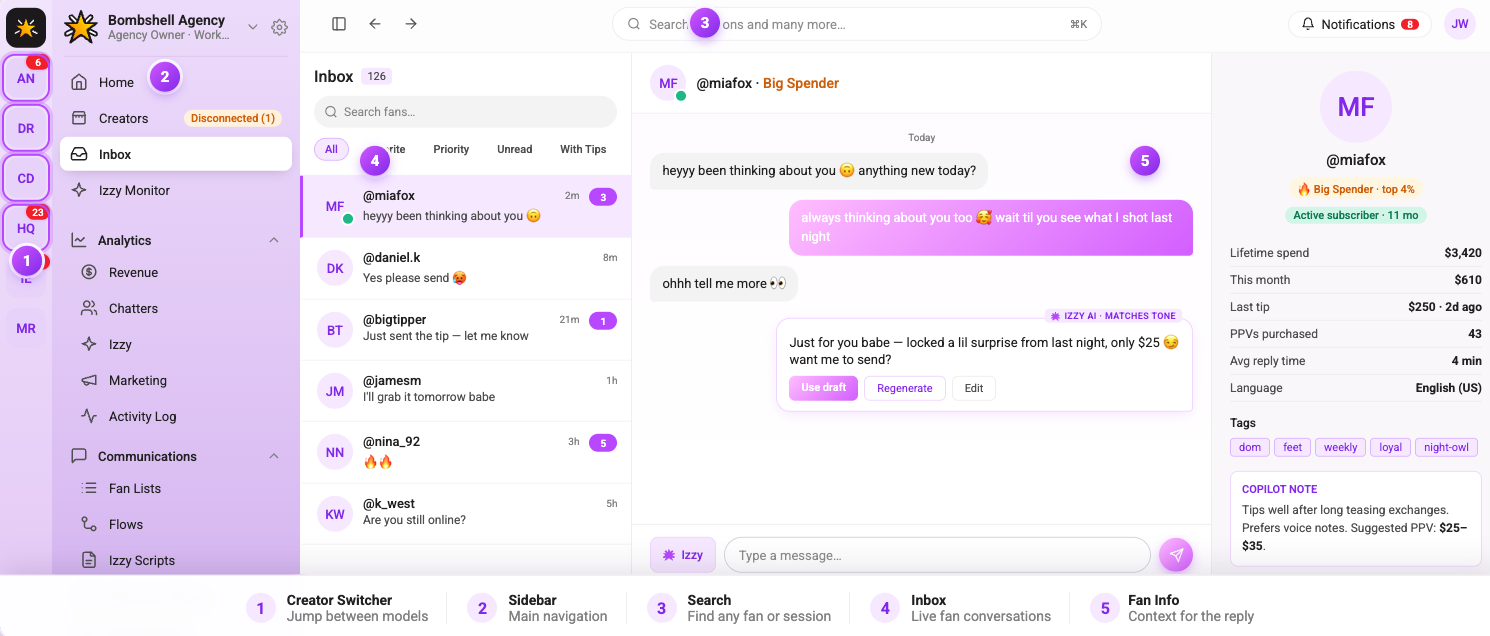
Once they are in, their first session should be orientation only. Show them the layout. Walk them through which accounts they have access to, how to find a fan's chat history, and where fan data lives. Do not put them on a live account on day one. The goal is familiarity, not production.
If the account is not showing up in their sidebar, it means the admin has not assigned it to them yet. This is worth troubleshooting before the orientation session so it does not eat up time.
Day 2: Learning the Fan Data Layer
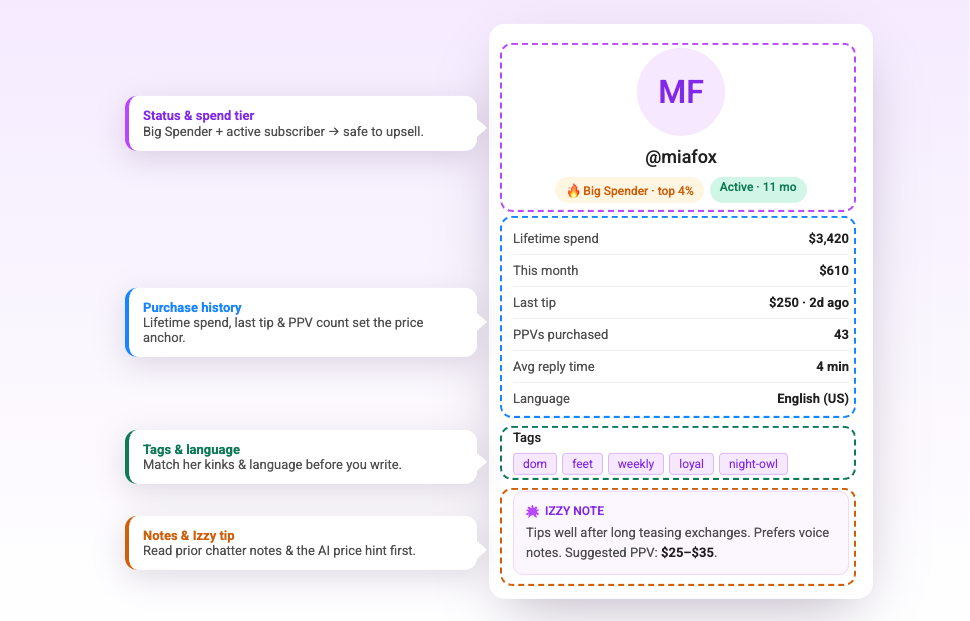
Before a chatter sends a single message, they need to understand how to read a fan. Supercreator surfaces each fan's purchase history, chat history, total spend, and content preferences before you open a reply window. This is what separates a targeted message from a generic one.
On day two, have the chatter spend time in the fan profiles without messaging anyone. Ask them to identify: who the top spenders on the account are, which fans have gone quiet in the last 30 days, and which content types are generating the most tips. This is an exercise in reading the data, not acting on it yet.
The OnlyFans CRM is where all of this lives. Getting comfortable with fan segmentation early means the chatter will send better messages from week one rather than defaulting to blasting everyone with the same offer.
Day 3: Learning the Voice and Tone
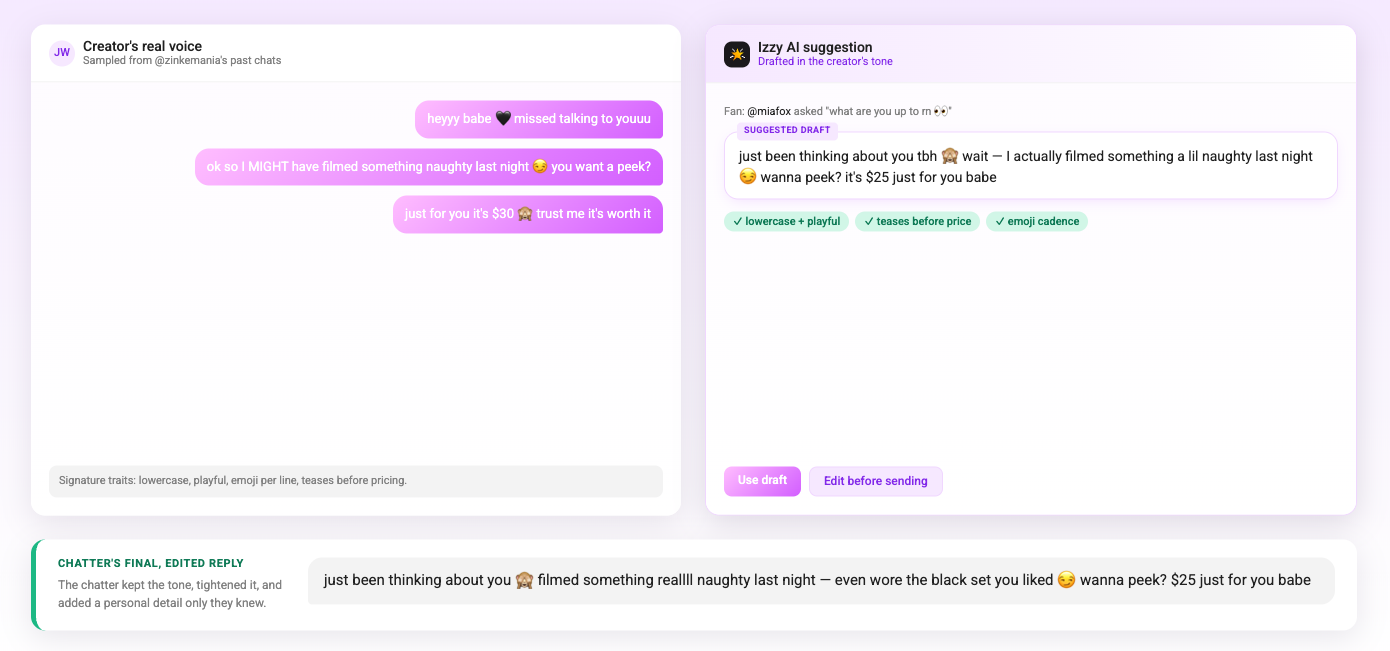
Every creator has a specific way they communicate with fans. A chatter who sounds nothing like the creator breaks the illusion immediately and damages trust with subscribers who have been on the account for months.
Day three is about tone calibration. Have the chatter read through a sample of the creator's existing messages, especially the ones that generated tips or PPV purchases, which are the most instructive. Then have them write ten sample responses to common fan messages without sending any of them. Review the drafts together and give specific feedback on where the tone is off.
The OnlyFans AI chatbot is configured to mirror the creator's voice, which gives the chatter a reference point. The AI's suggestions are a baseline that the chatter should be able to match and build on. If their drafts are consistently below the quality of the AI's suggestions, that is a training flag worth addressing before they go live.
Day 4: First Live Messages
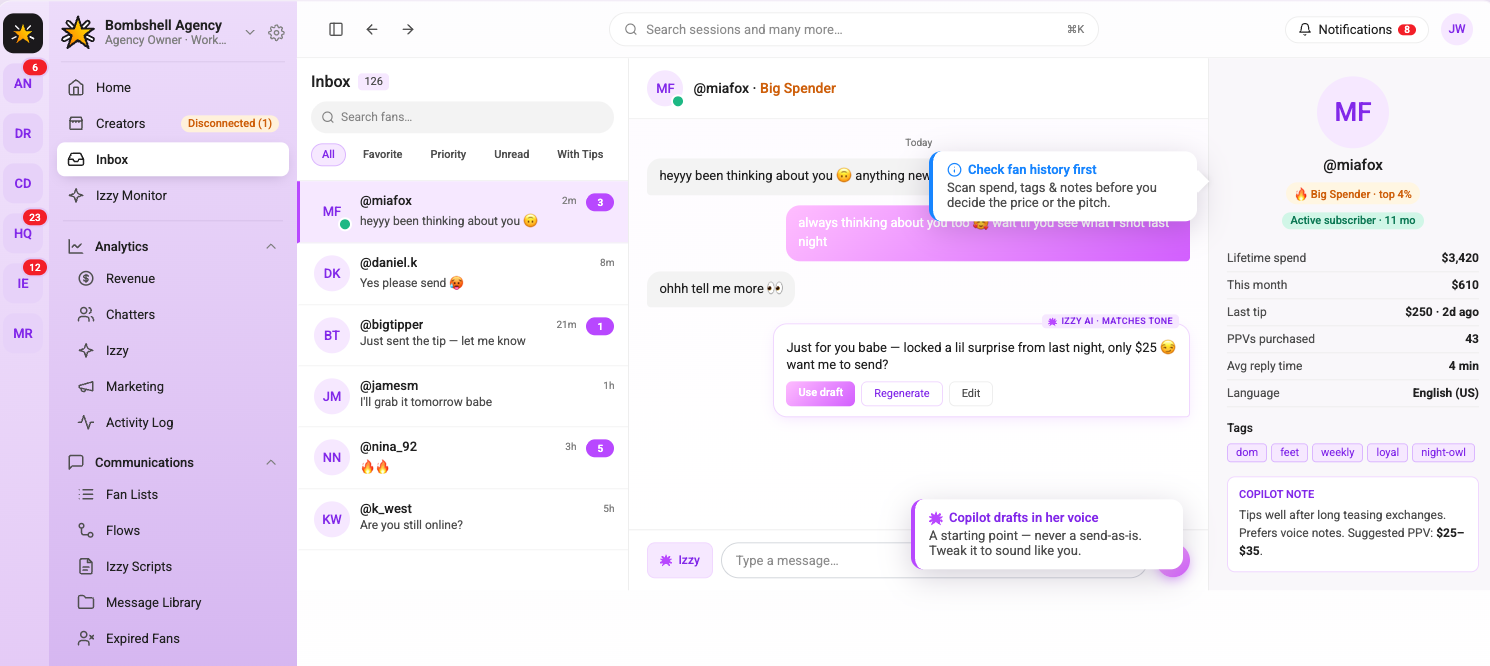
The chatter sends their first real messages on day four, but with guardrails. Start them on lower-value fans only; not the top spenders, not anyone in an active sales conversation. Let them handle routine responses, answer common questions, and send a few re-engagement messages to fans who have gone quiet.
Monitor the session closely. Review every message they send on day four. Look for tone inconsistencies, missed upsell opportunities, and whether they are using the fan context that Supercreator surfaces before replying. Give feedback the same day while the conversations are fresh.
The OnlyFans bot handles automated touchpoints like welcome messages and re-engagement sequences in the background. Make sure the chatter understands which interactions are automated and which require their direct input, so they are not duplicating messages that are already going out automatically
Day 5: PPV and Upsell Training
Handling routine messages is one skill. Selling is another. Day five is dedicated to PPV and upsell conversations: how to read when a fan is close to purchasing, how to pitch without being transactional, and how to follow up after a PPV goes unseen without coming across as pushy.
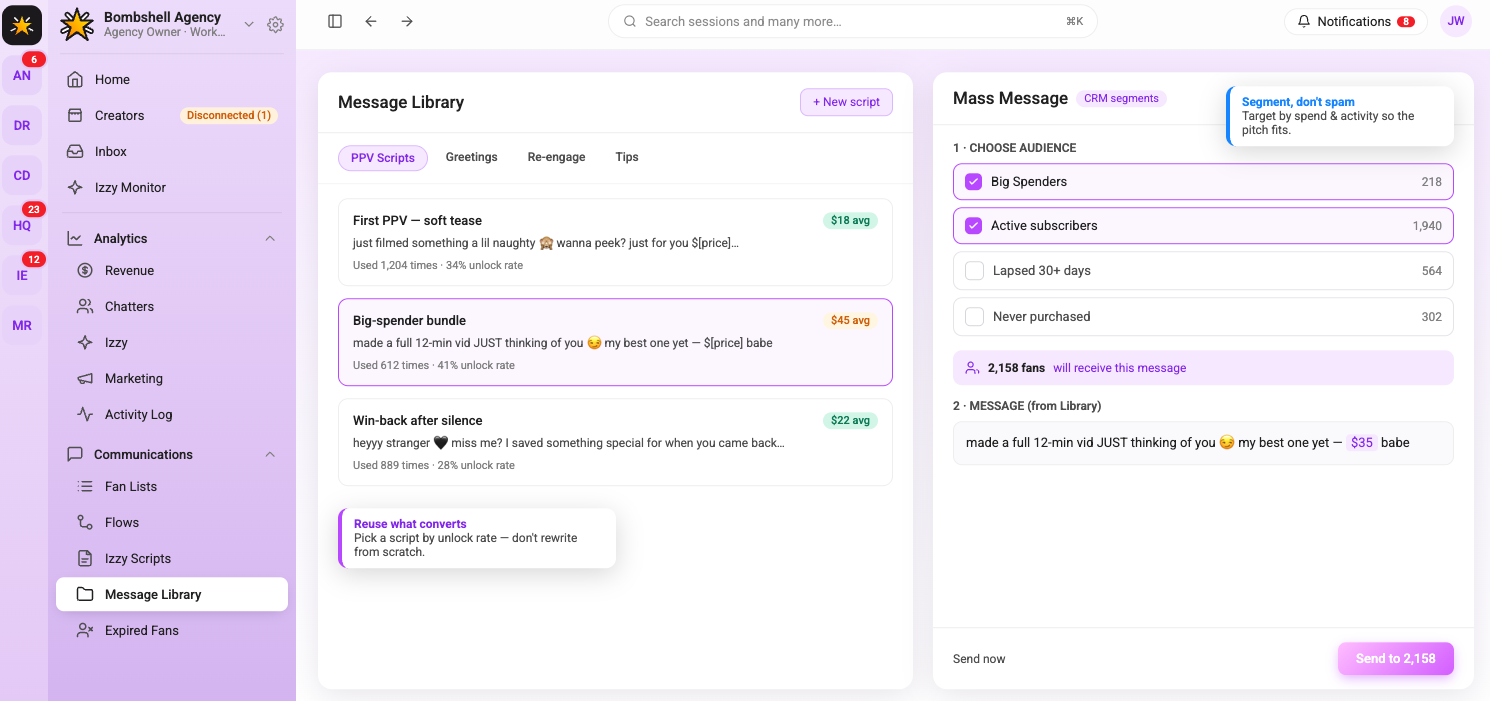
Walk through the agency's PPV scripts and mass message templates. Explain the logic behind each one, like why this offer goes to this segment, what the expected conversion rate is, and what a good response to a decline looks like. Role-play a few scenarios before the chatter tries it on a live fan.
This is also the point to introduce mass messaging. Show the chatter how to build a segment in the CRM, how to write a mass message, and how to track the results after it sends. Do not let them send a mass message independently on day five (that comes later). The goal today is understanding the mechanics.
Day 6: Independent Work With Monitoring
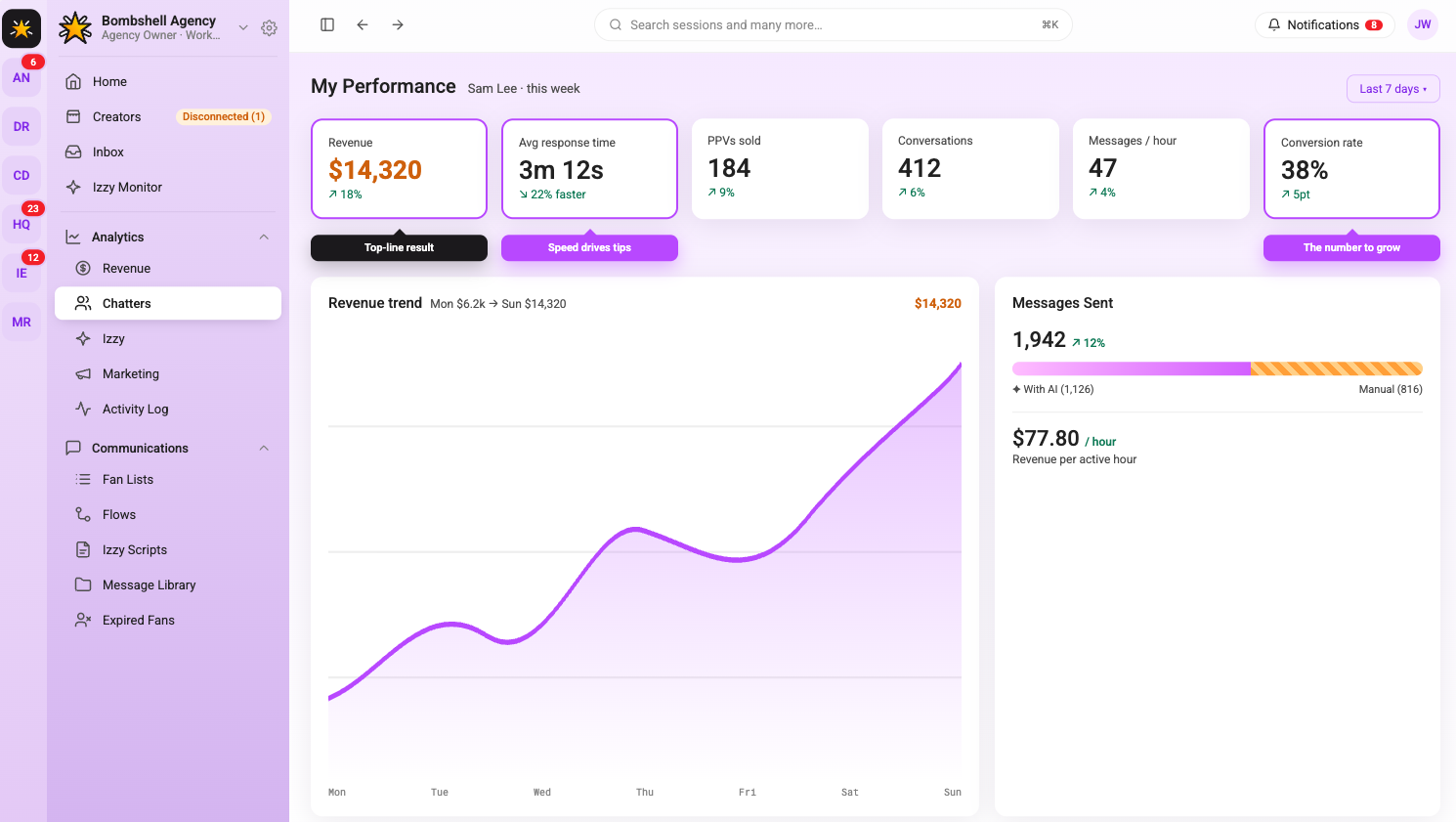
By day six, the chatter works a full shift independently on their assigned accounts. They handle routine messages, re-engagement, and PPV pitches without step-by-step supervision. The admin monitors performance through the analytics dashboard rather than reviewing every individual message.
Check the chatter's metrics at the end of the shift: messages sent, PPVs pushed, conversions generated, and response time. Compare against the account's baseline from before they started. These numbers are not the full story on day six (one shift of data means nothing), but they establish a starting point for the week two review.
Flag anything that looks off: response times over 20 minutes, PPV open rates significantly below the account average, or fan complaints. Address these specifically before the chatter's next shift, not in a general debrief.
Day 7: Review and Sign-Off
The final day of onboarding is a structured review, not another live shift. Sit down with the chatter and go through the week: what went well, what the metrics show, where the tone still needs work, and what they are not yet cleared to handle independently.
Agree on a clear scope for week two. Some chatters are ready to handle mass messages independently after seven days. Others need another week on single-fan conversations before they are trusted with account-wide sends. Be specific about what is and is not in their lane.
Set a two-week check-in to review performance metrics again. Onboarding does not end on day seven; it transitions into ongoing performance management. The first seven days are about getting the chatter operational. The following weeks are about making them consistent.
What Good Chatter Performance Looks Like
Agencies that onboard chatters without defining what success looks like end up with inconsistent results and no way to diagnose why. Before a chatter goes live, establish the benchmarks they are being measured against.
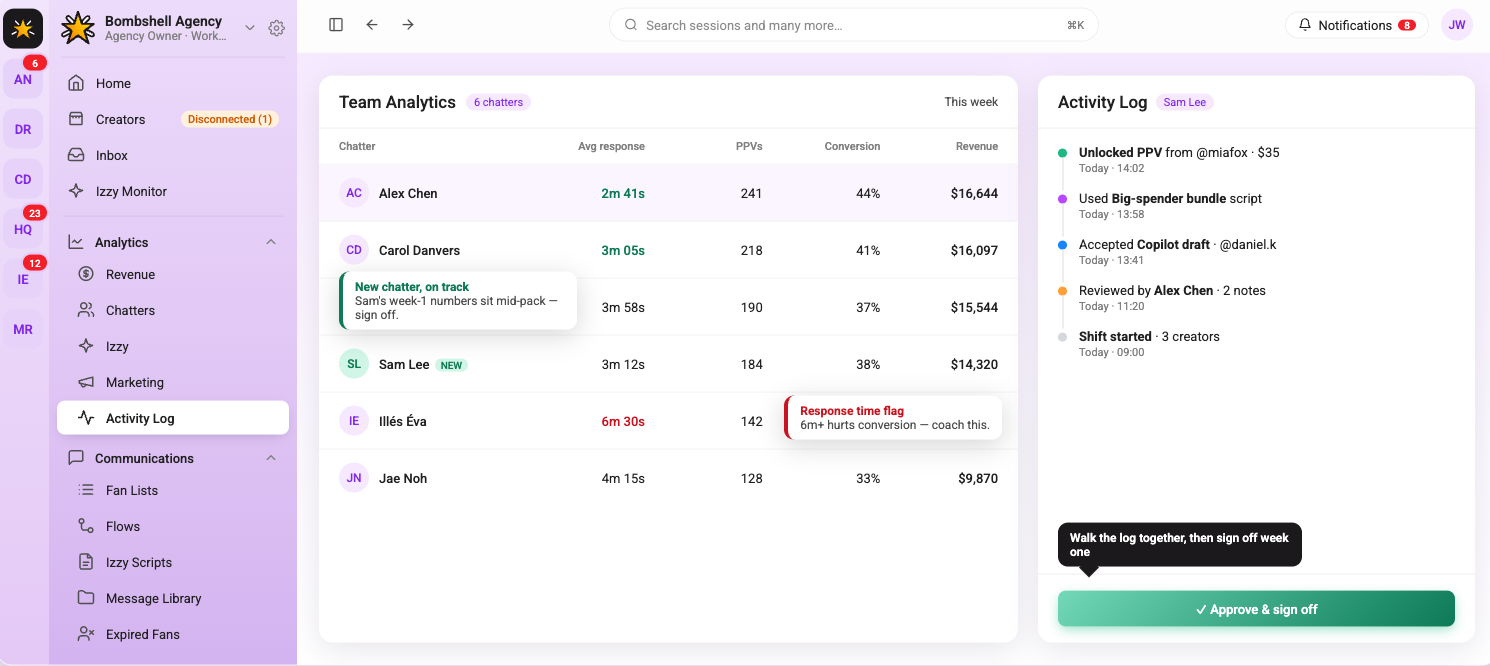
Response time is the most basic metric. Fans who wait more than 15 to 20 minutes for a reply are less likely to convert on a PPV offer. Message quality matters more than volume. A chatter sending 200 generic messages a shift is less valuable than one sending 80 targeted ones with a strong conversion rate. PPV conversion rate and tips generated per shift are the numbers that connect chatter performance directly to revenue.
Track these per chatter, per account, and per week. The analytics layer in Supercreator makes this visible without manually pulling data from multiple places. Agencies that monitor this consistently know which chatters are worth investing in and which need more coaching before they scale them to additional accounts.
A Seven-Day Onboarding That Sticks
Rushing a chatter through setup and dropping them on a live account is the fastest way to create problems that take weeks to fix. Seven days is enough time to get someone operational, calibrated to the creator's voice, and comfortable with the tools (if each day has a clear purpose).
The framework above is not a rigid script. Adjust based on the chatter's background. Someone who has worked with another agency's tools will move faster through the technical setup and spend more time on tone calibration. A brand new chatter needs more time on day four before they are ready for PPV conversations on day five.
The goal by day seven is a chatter who can handle a full shift with light supervision and knows exactly where their boundaries are. Everything after that is performance management, not onboarding.
How to Onboard OnlyFans Chatters in 7 Days Using Supercreator

Quick Answer: How Do You Set Up Izzy AI?
Setting up Supercreator's AI means connecting Izzy to your account, training her on your real chat history, and defining her rules before she goes live, so she automates routine fan conversations while your high-value fans still get a human. The whole setup takes a few hours when done properly, and the quality of that setup is what decides whether Izzy sounds like you or like a generic bot.
The setup in six steps:
- Connect Izzy to your OnlyFans messages, sales data, and fan profiles
- Train her on your voice with real chat history, your bio, and your product library
- Set the rules: which fans she talks to, when she is active, and how she escalates
- Turn on supporting automations: Flows, Bumps, and re-engagement sequences
- Review in preview and cap her volume before full rollout
- Monitor the dashboard and adjust from the data, not assumptions
Ready to hand off the repetitive inbox work? Set up Izzy and keep your top fans human.
Key takeaways:
- Izzy handles live fan conversations; Supercreator's Flows, Bumps, and Automations handle the triggered sequences alongside her. They cover the volume side and the high-value side together.
- The setup determines everything. Train Izzy on real chat history, fill out your bio, and load your product library so she knows what she is selling.
- Set the rules before she goes live: which fans she talks to, when she is active, and her escalation and moderation behaviour. Vague rules produce vague output.
- Review in preview and cap her chat volume before full rollout, then expand once you trust the tone and escalation.
- Keep high-value fans, custom requests, and emotionally complex conversations with a human. Izzy routes them rather than handling them.
- Refresh her training, product library, and escalation thresholds regularly. Check the dashboard weekly; a month of data shows real patterns.
How Supercreator's AI Automates Fan Conversations
Replying to fans takes time. A lot of it. For creators managing hundreds of active subscribers, keeping up with DMs while also producing content becomes a genuine operational problem. Izzy handles live fan conversations, including replies, personalized selling, and ongoing engagement, while Supercreator's automation tools handle re-engagement campaigns and follow-up sequences.
This is how to set her up and use her properly.
What Izzy Does
Izzy is Supercreator's AI chatbot, built specifically for OnlyFans fan communication. She syncs with your messages, sales data, and fan profiles, so every recommendation she makes is based on each fan's actual behavior rather than a generic script.
She can handle a high volume of conversations simultaneously, reply in multiple languages, identify which fans are likely to spend, and flag high-value conversations for human attention. Izzy handles the inbox volume that does not need your attention, so you can focus on the conversations that do.
Step 1: Connect Izzy to Your Account
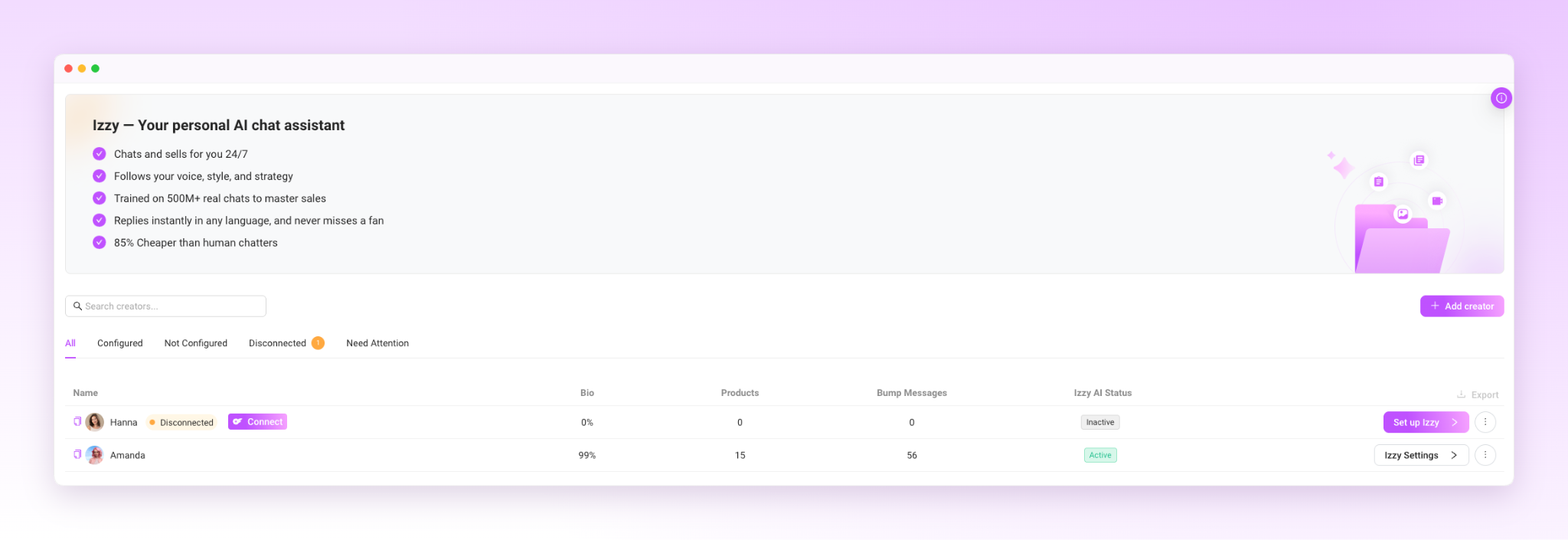
Izzy syncs directly with your OnlyFans messages, sales data, and fan profiles when you activate her. This connection allows her to personalize responses based on what each fan has purchased, how long they have been subscribed, and how they typically engage.
Before activating her, make sure the OnlyFans settings that can limit her performance are turned off. The Supercreator help center documents which settings need to be adjusted. Skipping this step means Izzy cannot message certain fans even when she is active.
Step 2: Train Her on Your Voice
This is the step that determines whether Izzy sounds like you or sounds like a chatbot.
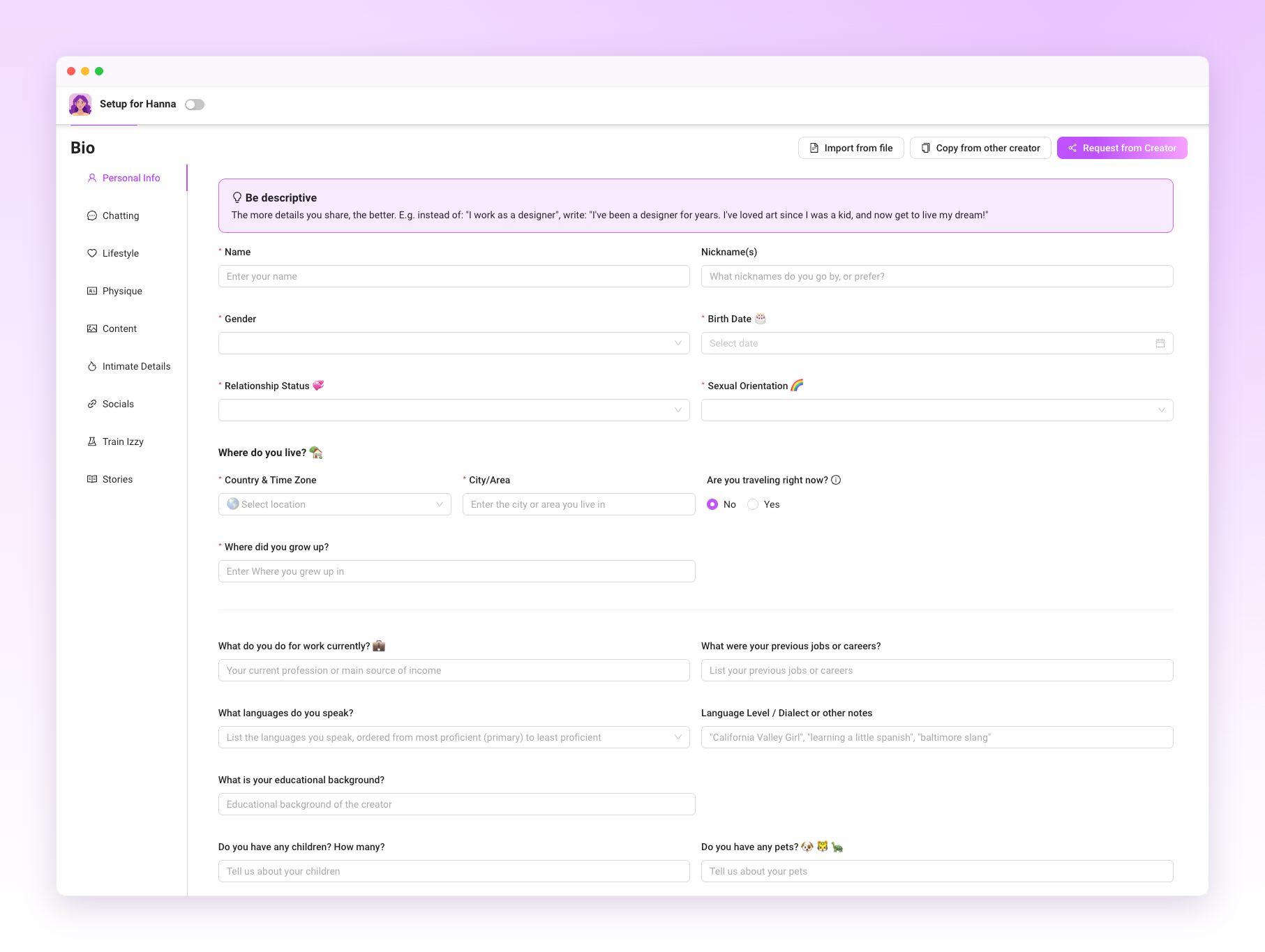
During onboarding, Izzy analyzes your existing chat history, tone, common phrases, and the emojis you use regularly. The more high-quality chat history Izzy can learn from, the better she can match your tone and communication style.
Beyond tone, fill out your creator bio in the Izzy setup and add your content and products to her library. Izzy needs to know what she is selling and what details to reference when fans ask questions. Keeping your products and content library up to date helps Izzy recommend the right content and create more relevant upsell opportunities.
One important detail: Write your setup instructions in the language you want Izzy to communicate in primarily. This gives her clearer guidance for matching your tone.
This helps her responses feel natural in that language rather than translated.
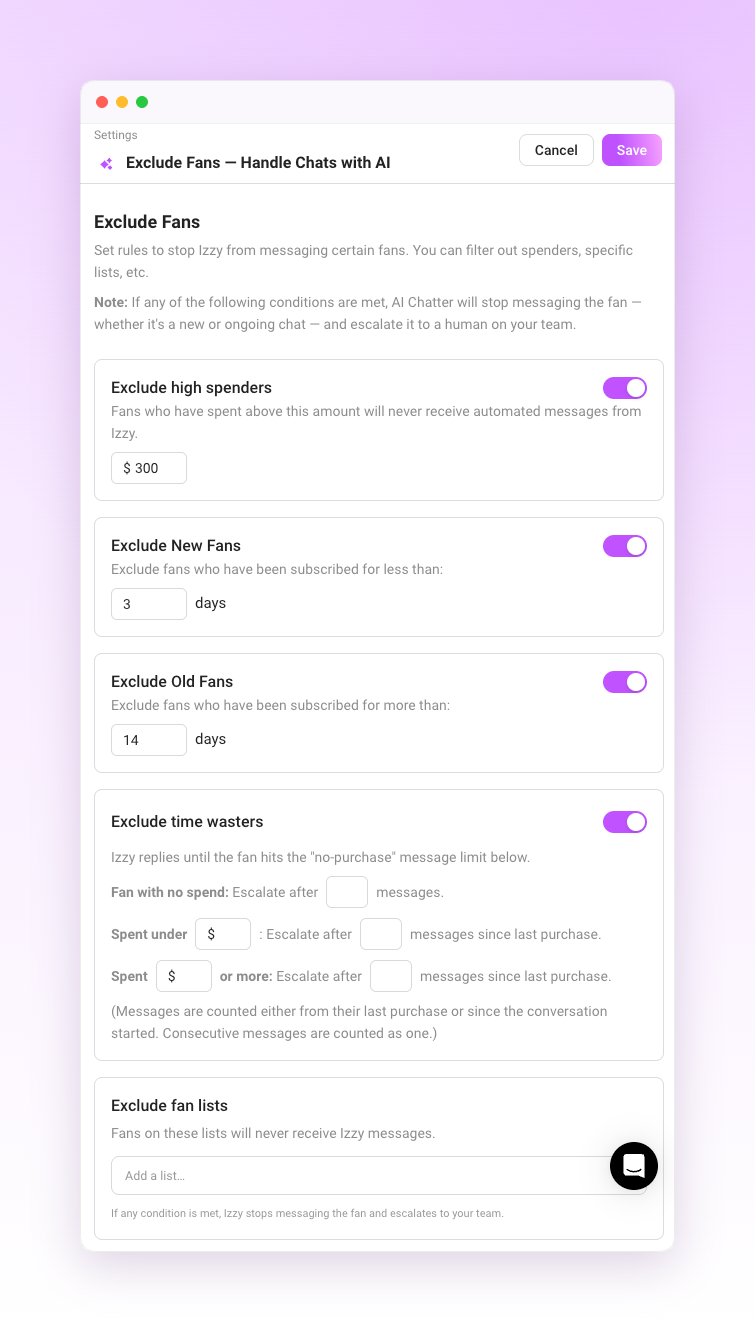
Step 3: Set the Rules Before She Goes Live
Izzy operates inside whatever parameters you define. Before activating her, decide:
Which fans does she talk to? You can exclude specific subscribers or entire Fan Lists from Izzy or automation entirely, which is useful for top spenders or fans you manage personally.
When she is active, you can set a schedule so Izzy handles the inbox during off-hours while you take over during your working hours.
How she should respond to specific scenarios. Configure conversation rules, exclusions, moderation behavior, and escalation settings before enabling Izzy.
Getting this right upfront is what keeps the account safe and the fan experience consistent. Izzy follows the rules you set. If the rules are vague, the output will be too.
AI disclosure: If you use Izzy to communicate with fans, make sure your account complies with OnlyFans' current AI disclosure requirements. Add the required AI disclosure to your profile before enabling AI conversations, and review it periodically to ensure it stays up to date.
Step 4: Turn On the Automations That Support Izzy
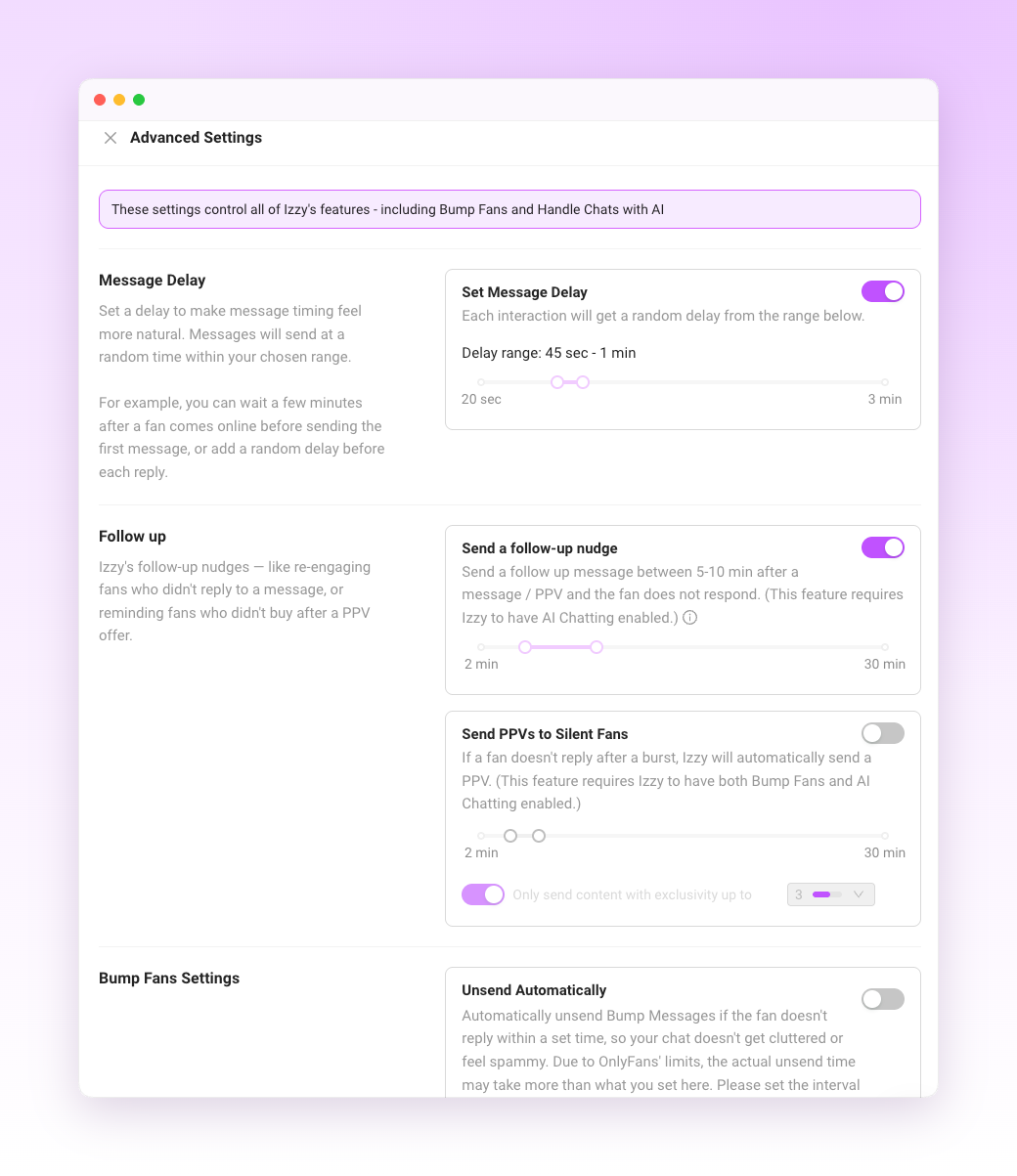
Izzy handles live conversations, while Supercreator's Flows, Bumps, and Automations handle the triggers that run alongside those conversations.
Flows send sequences of messages based on fan behavior: a welcome sequence when someone subscribes, a follow-up after a PPV purchase, and a re-engagement message after a period of inactivity. Bumps resurface content or offers in conversations that have gone quiet.
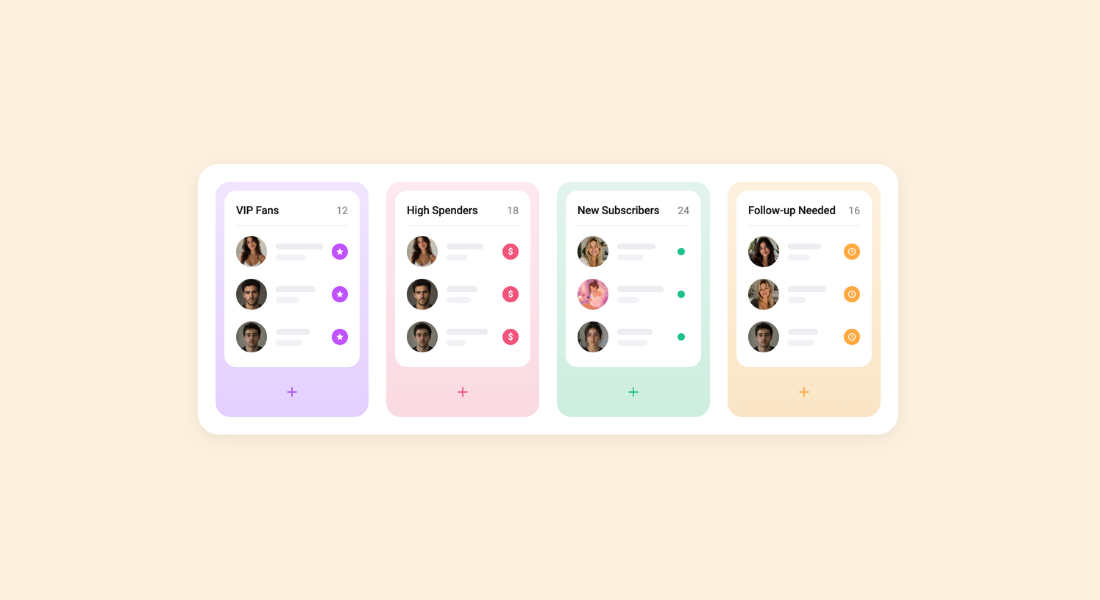
These automations work best when they’re tailored to specific fan segments rather than sent to everyone. A new subscriber and a fan who has been with you for a year and has spent significantly need different messaging. Fan Lists, Segments, and CRM data tell you which fans belong where and how much they've spent across your workspace, so the automations deliver the right message to the right person at the right time.
Step 5: Review Before You Go Live
Supercreator lets you preview Izzy's conversations during onboarding before she is active on your account.
You can also set a limit on how many chats Izzy handles initially. Starting with a smaller volume lets you check her output in real conditions without the full inbox being managed by AI before you are confident in how she sounds.
Common things to check in the preview:
- Does the tone match yours?
- Is she referencing fan history correctly?
- Are the upsell suggestions appropriate for the fan she is talking to?
- Are the escalation triggers working so that high-value conversations are being flagged rather than handled automatically?
Adjust anything that feels off before you expand her access.
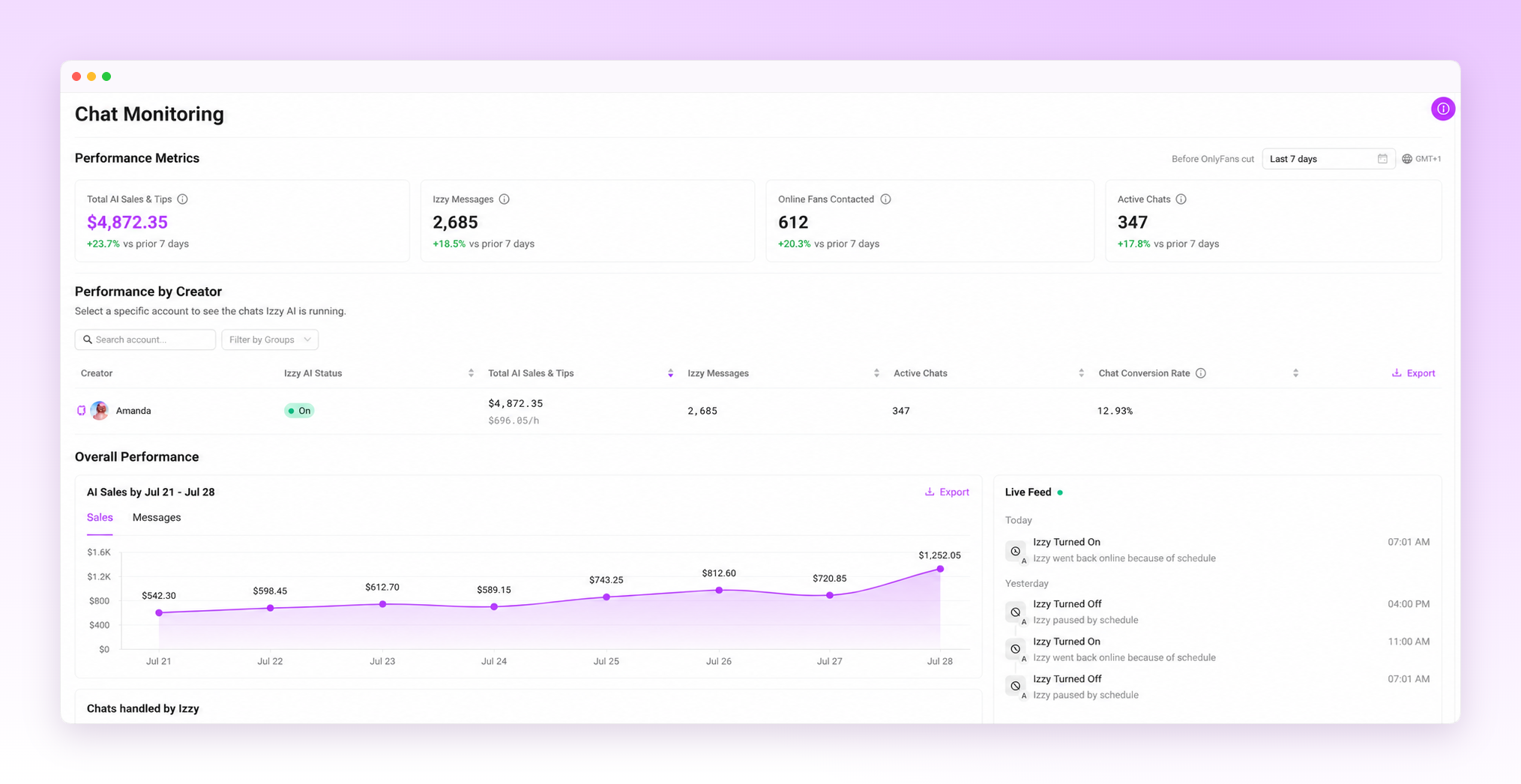
Step 6: Monitor and Adjust from the Dashboard
Once Izzy is live, the dashboard lets you monitor conversations, performance, and key revenue metrics associated with AI-managed chats. This is where you track whether the setup is working and where you make adjustments.
The OnlyFans CRM layer underneath this tracks each fan's full history, spending patterns, and engagement data. Izzy uses available CRM context when generating responses, which is one of the differences between her and a human chatter who may not have time to review an entire conversation history before replying.
Check the dashboard regularly in the first two weeks. Look at which fan segments are converting, which types of messages are generating the most revenue, and whether any conversations are being escalated that probably should not be or handled automatically when they should have been flagged. Adjust Izzy's settings based on what the data shows rather than assumptions.
When to Take Over Manually
The fans worth managing personally are the ones spending consistently above average, the ones making custom content requests, and the ones who have been with you long enough that they expect a real connection. Consider escalating these conversations using Izzy's escalation rules rather than managing them with AI.
Beyond high-value fans, any conversation that feels emotionally complex, sensitive, or outside the normal patterns Izzy is trained on should be reviewed personally. Izzy is not equipped to handle every scenario, and the moderation system flags messages that involve prohibited topics. Anything that gets escalated using Izzy's escalation rules needs a human decision.
What Creators Actually Get Back
The practical outcome of a well-configured Izzy setup is time. Fans get faster responses, including at hours when you are not online, and those responses are shaped by their full conversation history rather than just the current thread. You get back the hours that were going into repetitive inbox management.
What changes operationally: the conversations that needed a human still get one, because Izzy is routing them rather than handling them. The conversations that do not need a human are handled consistently, at any hour, without burning out a chatter or eating into your content creation time.
The setup takes a few hours to do properly. After that, the adjustment is ongoing, but still light.
Getting the Most Out of Izzy
A few things that separate well-configured accounts from ones that underperform:
- Update her training data regularly. Your voice evolves. Refresh Izzy's training periodically as your tone, products, or messaging evolve.
- Add new content and products to her library as you create them. Izzy cannot recommend or upsell content she does not know exists.
- Review escalation patterns. If high-value fans are not being flagged or are waiting too long for human attention, adjust the thresholds.
- Check the dashboard weekly. One week of data means very little. A month of data shows patterns worth acting on.
Izzy Works When the Setup Does
A poorly configured Izzy produces generic output that erodes fan trust. A well-configured one handles the volume of a growing account while keeping conversations personal and consistent.
The difference is almost entirely in how seriously you take the setup steps. Upload real chat history, define your rules clearly, protect your high-value fans, and keep the training current. Do that, and Izzy helps save time, improve consistency, and give you more room to focus on high-value conversations.
Other Features Worth Knowing About
Inbox Copilot lets you prioritize which conversations to open first, using tags like Urgent Priority, Hot Buyer, New Subscriber, and Expired.
If you communicate with fans in multiple languages, enable Auto-Translation so incoming and outgoing conversations stay natural without manual translation.
Izzy also has access to total fan spend across your workspace, giving her more context when personalizing responses and recommendations.
How to Set Up Supercreator's AI (Izzy) to Automate and Personalize Fan Chats

Starting Supercreator: What to Expect in Your First 14 Days
Top Strategies for Managing Subscriber Relationships on OnlyFans Using CRM Tools
Managing multiple accounts is a different problem than managing one account well. It's not about content or fan engagement anymore. It's about who has access, how they get it, and how cleanly they can move between accounts without breaking something.
This guide covers the two ways agencies actually solve this, how to set up access without handing out your real passwords, and the account-switching workflow that keeps a chat team moving during a shift.
What "Managing Multiple Accounts" Actually Involves
Once you're past one account, three problems show up whether you notice them or not: account isolation (keeping each profile's login, activity, and identity separate), team access (giving chatters and managers the right level of entry without sharing your actual credentials), and switching speed (how fast someone can move between accounts during a shift without logging in and out repeatedly).
Get any one of these wrong, and it shows up as a real cost. Shared logins mean you can't tell who did what when something goes sideways. Slow switching means chatters spend shift time navigating instead of chatting. Poor isolation between accounts increases the odds that a problem on one profile spills into another.
Two Primary Approaches Agencies Handle This
Most agencies land on one of two approaches, and they solve the problem differently.
Anti-detect browsers with dedicated proxies. This is the manual route: a separate browser profile and a unique residential proxy per account, each with its own fingerprint, so each browser profile presents a separate browser environment with its own cookies, fingerprint characteristics, and typically its own residential proxy. It works, but it places the burden of isolation entirely on you. You're managing proxy subscriptions, browser profiles, and credential sets by hand, and every new account or new chatter means setting the whole stack up again.
CRM-based access management. This route focuses on centralized access management instead of requiring every chatter to maintain separate browser profiles. Chatters get access to specific accounts without ever seeing your OnlyFans password, and switching between accounts happens inside one interface instead of a browser profile switch. Supercreator's access management layer works this way: an admin connects the account once, then assigns team members without handing over credentials at all.
Neither approach is wrong. The proxy-and-browser route gives you more control if you're deliberately running many isolated personas. The CRM route is faster to set up and easier to hand off to a growing team, which is why most agencies past a handful of accounts move toward it.
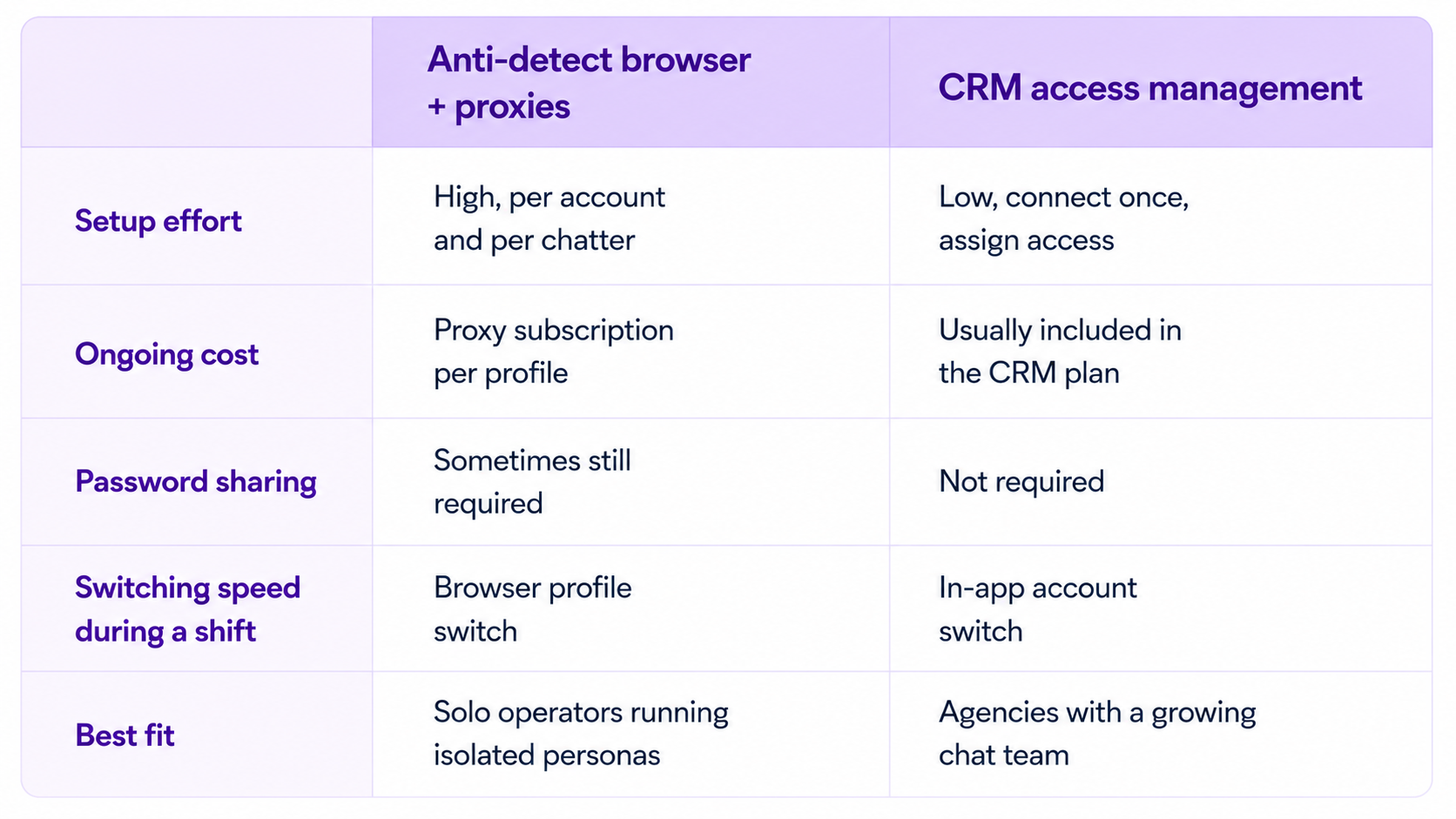
*Regardless of which approach you choose, make sure it complies with OnlyFans' Terms of Service and any agreements you have with the creators you manage. Access management tools should improve security and team workflows, not bypass platform policies
Setting Up Access Without Sharing Passwords
Whichever route you choose, the same principle holds: nobody on your team should ever need your actual OnlyFans login. A few things to get right from the start.
Register each account with its own credentials. A distinct email and phone number per account keeps them separate at the platform level, which matters regardless of which access method you're running on top of it.
Add each account individually to your access management tool. An admin connects the account once, and from there team members get access through the platform rather than the real login. This is the step that actually removes password sharing ƒ
Set roles before you add people, not after. Decide who's an admin, who's a manager, and who's a chatter before you start onboarding, so nobody ends up with more access than their role needs by default.
Chatter Permissions: Who Should See What
Not every chatter needs to see everything. A chatter working a single account's DMs doesn't need visibility into revenue reports across your whole roster, and a new hire shouldn't have the same access as someone who's been running your top account for a year.
Role-based permissions solve this by tying access to the job, not the person. The exact permissions depend on the software you're using, since different CRMs expose different permission models. A chatter role typically gets chat access to their assigned accounts only. A manager role adds visibility into performance data and the ability to reassign chatters. An admin role keeps full account connection and billing control. Setting these up inside your CRM means a chatter leaving doesn't require you to change any actual OnlyFans passwords, since their access was never tied to the real login in the first place.
Account Switching During a Shift
A chatter working three accounts in one shift shouldn't be logging out and back in three separate times. The workflow that actually holds up:
Accounts get added to the workspace once by an admin, and from there, chatters see every account they're assigned to inside a single sidebar or account switcher. Moving from one conversation to another is a click, not a login screen. If a chatter's shift covers accounts with wildly different volume, faster switching means less dead time between conversations, and dead time is the thing that actually costs revenue on a busy shift.
If your team is still logging in and out of separate browser sessions to cover multiple accounts, that's usually the first sign it's time to move off the manual setup and into a proper access management layer.
Common Mistakes When Managing Multiple Accounts
Sharing one password across the whole team. This is still the most common setup mistake, and it's also the hardest one to unwind later, since you'd need to rotate the password every time someone leaves. Set up role-based access from day one instead.
Giving every chatter full account access. Broad access feels convenient at first and turns into a real risk the moment a chatter leaves on bad terms or a mistake happens, and nobody can trace who made it.
Treating account switching as a minor inconvenience. Slow switching adds up across a full shift and across a full team. If chatters are losing meaningful time navigating between logins, that's lost chat volume, not just an annoyance.
Adding automation before access is sorted. Chat automation helps once your team structure is solid, but bolting it onto a setup with shared passwords and unclear roles just adds another layer of confusion on top of an already fragile system.
If you want the deeper walkthrough on multi-login software specifically, Best Way to Manage Multiple OnlyFans Chatters and Accounts Worldwide covers that in more depth. And once you're past a handful of accounts and thinking about scaling without adding headcount, How to Scale OnlyFans Account Management to 50+ Accounts Without a Huge Team picks up from there.
Final Words
Managing multiple OnlyFans accounts well isn't about finding a clever workaround. It's about setting up access once, correctly, so growth doesn't mean more risk every time you add an account or a chatter.
If you're managing several accounts and a growing chat team, Supercreator's access management sets up role-based permissions and account switching without distributing your OnlyFans credentials to every chatter.
- Connect each account once, assign chatters without handing over credentials
- Switch between accounts in one interface instead of separate browser logins
- Remove a chatter's access instantly if they leave, with nothing to rotate
Book a demo to see it set up on your accounts, or start free if you're just getting your first few accounts organized.
How to Manage Multiple OnlyFans Accounts

Camming and OnlyFans aren't competing income streams. They're two different stages of the same funnel, and treating them that way is what separates creators who cam for tips and creators who build a real business on top of it.
Live cam sites bring in fast, high-energy revenue. Someone tips you $30 mid-show, and that's it; the transaction is done. OnlyFans works differently: a fan who subscribes for $15 a month and buys PPV content on top can be worth far more over a year than any single tip. The creators earning the most from webcam work aren't just picking a good platform. They're using cam shows to find spenders, then moving those spenders onto OnlyFans where the relationship keeps paying.
This guide covers the cam platforms worth your time in 2026, what makes each one different, and how to stop losing the fans you already earned once the stream ends.

What Counts as a Cam Site?
A cam site lets you broadcast live video and get paid in real time through tips, pay-per-minute private shows, and sometimes subscriptions. Fans watch and interact through chat while you're live, which is a different kind of connection than posting photos or clips for someone to view later.
That immediacy is the appeal. A fan who's mid-tip during a live show is in a different headspace than someone scrolling a feed. But it also means the value disappears the moment you go offline, unless you've built a way to keep that fan around.
The Best Cam Sites to Make Money in 2026
Chaturbate: Best for Traffic and Discovery
Chaturbate is one of the largest cam platforms by monthly visitors, and its free, no-registration model means new creators can show up in public listings and get seen without an existing audience. Publicly reported payout rates sit around 60%, with successful models reportedly earning anywhere from $3,000 to over $20,000 a month, though these figures vary widely by niche and consistency.
Features:
- Free public chat with tip-driven revenue
- Pay-per-minute private sessions
- Fan Club subscriptions
- Split-cam streaming across multiple sites at once
Chaturbate is the strongest starting point if you don't have traffic yet. The catch: high visitor volume means high competition for attention, so your first few minutes on stream need to hook viewers fast.
BongaCams: Best Payout Rate
BongaCams advertises payout rates up to 90%, among the highest publicly listed in the industry, with a strong European fan base and promotional boosts for new models. Reported earnings for active models range from roughly $3,000 to $8,000 a month.
Features:
- Tips and pay-per-minute private chats
- New-model promotional boost
- Merchandise and content sales
- Multilingual support
BongaCams rewards creators who move fans from public chat into private sessions quickly, since that's where the higher payout share compounds. If your fan base skews European, this is worth prioritizing over Chaturbate.
Stripchat: Best for Engagement
Stripchat leans on gamification: viewer goals, tipping leaderboards, and virtual gifts that keep fans spending in a way that feels more like a game than a transaction. Reported model earnings range from about $7,900 to $15,100 a month, with payout rates between 50% and 63%.
Features:
- Goal-based tipping and virtual gifts
- Mobile-first design
- Localized, geo-targeted viewer recommendations
- Achievement and leaderboard mechanics
This site rewards a consistent schedule. Fans come back for shows they can plan around, so a predictable streaming time matters more here than on Chaturbate.
MyFreeCams: Best for Long-Term Loyalty

MyFreeCams runs on voluntary tipping instead of goal mechanics, and that changes who tips: fans who support you here tend to be genuinely invested rather than reacting to a countdown timer. Models reportedly earn 50% to 60% of tips and private session revenue, and the platform's long-running community is known for fans who stick around for months or years.
Features:
- Free public chat with voluntary tipping
- Pay-per-minute private sessions
- One of the longest-running cam communities online
- Strong repeat-viewer culture
MyFreeCams suits a girlfriend-experience style of camming better than a high-energy public show. If your OnlyFans persona already leans on personal connection, read our guide on the girlfriend experience for how to carry that same intimacy into a stream.
LiveJasmin: Best for Premium Positioning
LiveJasmin markets itself as the high end of camming: polished production, stricter model standards, and a smaller but higher-spending audience. Reported payout ranges from 35% to 80% depending on status level, and the site is known for attracting fans willing to pay significantly more per session than average.
Features:
- Premium production and presentation standards
- Tiered payout based on model status
- Wealthier, European-heavy audience
- Higher average spend per session than most competitors
LiveJasmin only works if you can sustain the aesthetic it's known for. Don't undercut your own rates here. Fans on this platform are already paying more because they expect more.
Comparison at a Glance
These numbers are third-party estimates, not verified data, and actual earnings depend heavily on niche, consistency, and how well you convert viewers into repeat spenders.
Where Cam Creators Actually Lose Money
Here's the catch most creators miss: the biggest revenue leak in camming doesn't happen during the show. It happens in the hours after, when a fan who tipped, booked a private session, or subscribed to a Fan Club simply disappears because nobody followed up.
No follow-up after the stream ends. A viewer who had a private session and hears nothing from you within a day rarely books again. One who gets a personal follow-up message often does.
No way to tell your spenders apart. Treating a $200 tipper the same as a $5 tipper wastes the exact relationship that would have been worth converting to a paying OnlyFans subscriber.
No plan for language barriers. BongaCams and LiveJasmin both skew European. If you're only messaging in English, you're leaving revenue on the table with fans who'd spend more if the conversation felt natural in their own language.
This is exactly the gap Supercreator's tools are built to close on the OnlyFans side. Fan Lists let you segment cam-sourced subscribers by spend the moment they join, so your highest tippers get treated differently from casual viewers instead of getting the same generic welcome message. The Message Library keeps your best follow-up templates one click away, so a fan who just left your cam show gets a personal-feeling reply in seconds instead of losing momentum while you draft one from scratch. And Auto-Translation means a BongaCams tipper messaging in Portuguese or Spanish gets a natural reply either way, without you needing to speak the language yourself.
Turning a Cam Viewer Into a Paying OnlyFans Fan
The creators earning the most from camming treat every stream as a two-step process, not a one-time event.
During the show, mention your OnlyFans directly to your top tippers rather than relying on a bio link nobody clicks. Make it part of your normal stream flow, not an afterthought.
Right after the show, follow up with anyone who tipped heavily or booked a private session while the connection is still fresh. This is the single easiest revenue recovery move available, and it's the one most creators skip.
Once they subscribe, treat cam-sourced fans differently from fans who found you cold. They already know your voice and your energy. A generic welcome message wastes that head start. If you want the fuller picture on keeping any fan around past the first few weeks, our guide on OnlyFans retention covers the habits that turn a first subscription into a long-term spender.
If you're camming directly on OnlyFans itself rather than a third-party site, the mechanics shift slightly since you're not converting a viewer across platforms. Our guide on livestreaming versus camming on OnlyFans breaks down when that's the better call.
Equipment Worth the Investment
You don't need a studio setup to start, but a few upgrades pay for themselves fast:
Lighting: A basic ring light removes harsh shadows and makes the biggest visible difference for the least money.
Webcam: 1080p resolution with decent low-light handling is the baseline fans expect in 2026.
Internet: Stable upload speed matters more than raw speed. A dropped stream mid-tip is a lost sale.
Audio: A simple external mic beats built-in webcam audio every time.
Remember that balance matters here. Spend on what actually shows up on camera before anything else.
Frequently Asked Questions
Which cam site pays the most?
BongaCams advertises the highest payout percentage, up to 90% in some tiers, but Chaturbate's much larger audience can produce higher total earnings for creators who perform well in public chat. The right platform depends more on your style than on the payout number alone.
Can I cam on OnlyFans directly instead of a third-party site?
Yes. OnlyFans supports live streaming with tips, subscriptions, and PPV built in, which skips the cross-platform conversion step entirely since your viewers are already subscribers or potential ones.
How much do cam creators actually make?
Reported ranges vary enormously by platform and niche, from roughly $2,000 to $3,000 a month for newer creators up to $10,000 or more for established ones. These are third-party estimates, not guarantees, and consistency matters more than platform choice.
Do I need expensive equipment to start camming?
No. A ring light, a decent webcam, and stable internet cover the basics. Everything else, like a DSLR camera or professional audio setup, is worth adding once you're earning consistently, not before.
Is it worth converting cam viewers into OnlyFans subscribers?
Yes. A one-time tip generates one payment. A converted OnlyFans subscriber can generate recurring subscription revenue plus PPV purchases for as long as they stay subscribed, which is why the follow-up step matters more than the tip itself.
Grow your OnlyFans past the tip jar. Fan Lists, the Message Library, and Auto-Translation help you catch every cam-sourced fan before they disappear and turn a one-time tipper into a paying subscriber.
Get started for free or see how Izzy keeps the conversation going after the stream ends.
Best Cam Sites for Making Money with a Webcam in 2026
No, you don't need to hire a 20-person team to run a serious OnlyFans account. Some solo creators manage six-figure months with the right setup and one or two trusted people helping out. But you do need to understand what "management" actually covers, because the term gets used loosely across the industry, and knowing what's included changes who you hire, what you pay, and what you should expect back.
What OnlyFans Management Actually Means
OnlyFans management is the ongoing work of running a creator's account as a business: chatting with fans, promoting on other platforms, keeping the account itself optimized, and protecting the content from being stolen or leaked. Some creators handle all of it themselves. Others hire an assistant for the parts that eat the most time. Larger operations hand the whole thing to an agency that runs it like a sales floor.
The confusion usually starts here: "management" can mean a single virtual assistant scheduling posts for $200 a month, or it can mean a full agency taking 30% of gross revenue and running a 12-person chat team. Both call themselves OnlyFans management. Only one of them is going to move your numbers.
The Core Services Every Management Operation Runs
Whether it's a solo creator with one assistant or an agency with a full floor of chatters, the same four categories of work show up every time. The difference is scale and who's doing it.
Chatting and Fan Interaction
This is where the money actually gets made. Direct messages are where PPV content gets sold, where fans get upsold to higher tiers, and where a casual subscriber turns into a high-value repeat customer who spends hundreds a month. High-performing accounts often aim for broad coverage across different hours, since fans purchase on their own schedule, often late at night or during a lunch break, and a slow reply can reduce the chance of converting interested fans into buyers.
Here's the catch: coverage without quality is just noise. A chat team answering fast but sending generic, copy-paste replies will convert worse than a smaller team that actually reads what a fan wrote and responds like a person. Volume matters, but only once the conversation quality is there to back it up.
Social Media Funneling
An OnlyFans account doesn't grow on its own. The traffic usually comes from X, Instagram, TikTok, Reddit, and more, where a creator or agency posts free previews, teasers, and calls to action that push followers toward the paid page. This is often the most visible part of management from the outside, since it's the content people actually see before they ever subscribe.
Good funneling isn't just posting more. It's matching the platform: what works as a TikTok hook falls flat as an X caption, and vice versa. Agencies that manage multiple creators usually build a repeatable posting cadence per platform rather than improvising content day to day.
Account Optimization
This is the quieter, more operational side: scheduling posts so the feed stays active, structuring subscription tiers so fans have a clear reason to upgrade, and tracking which content and price points actually perform. It's less glamorous than chatting or social growth, but it's the layer that turns a good month into a repeatable one.
So, how do you know if your account is optimized? Look at whether your tiers are actually being used. If every subscriber sits on the base tier and nobody upgrades, the pricing structure isn't doing its job, no matter how good the chatting is underneath it. The same logic applies at the PPV level: charging every fan the same price for the same content ignores what each fan has actually shown they're willing to pay, which is money left on the table.
Content Protection
Leaked content is a real cost, not just an annoyance. Watermarking, monitoring for leaks across piracy sites and Telegram groups, and having a takedown process in place protects revenue that would otherwise get siphoned off by people never paying a cent. Bigger agencies build this into their standard service. Solo creators often skip it until the first leak happens, which is the wrong order to learn the lesson in. Knowing the actual steps to take once content gets stolen, from documenting it to filing a takedown, saves a lot of panic later.
How Top Solo Creators Run Their Own Accounts
Independent creators making real money rarely do everything by hand. Most build a lean system: one or two trusted people helping with chat during off hours, a content calendar planned a week or two out, and some kind of tool tracking which fans are spending and which have gone quiet. The creator stays the face and voice of the account, but the operational load gets split.
The biggest mistake solo creators make is treating every fan the same. A subscriber who's spent $12 total and one who's spent $600 need completely different attention. Top earners build a rough system for spotting their high spenders, whether that's manual notes or an actual fan CRM, so their limited time goes toward the relationships that pay. For the specific inbox habits and content systems that make this work day to day, this breakdown of how organized creators run their accounts covers it in more detail than fits here.
Remember that balance matters here. Chatting all day without sleep isn't sustainable, and it isn't necessary either. The goal isn't more hours in the inbox. It's making the hours you do spend count more, which is exactly where an AI chatter that handles first replies and low spenders has started changing what "solo" management looks like.
How Top Agencies Run Their Accounts
Agencies operate more like a sales floor than a creative studio. A typical structure splits creators across a small team of chatters, with a manager overseeing volume, tone, and conversion rates across the roster. The best agencies build tiers into how they staff: junior chatters handle lower-spend, high-volume conversations, while senior chatters or the creator themselves step in for VIP fans and custom requests.
Access is a real operational concern here, not an afterthought. Handing out an OnlyFans password to ten different chatters is a security risk waiting to happen. Agencies that run this well use platforms with role-based access, allowing each chatter to have their own secure login instead of sharing a single password, which improves accountability when issues arise in a conversation.
Performance tracking is what separates agencies that scale from ones that plateau. Messages per hour, revenue per chatter, and conversion rate by shift are the numbers that tell a manager whether someone needs coaching or whether an account itself has a pricing problem. That's a coaching problem, not a hiring one, more often than agency owners assume when a chatter's numbers dip. For a deeper look at setting up role-based access and chatter benchmarks, it's worth reading as its own guide.
Matching Management to Where You Actually Are
Not every creator needs the same setup, and buying more management than your account can support just eats margin. Here's a plain breakdown of what typically fits at each stage:
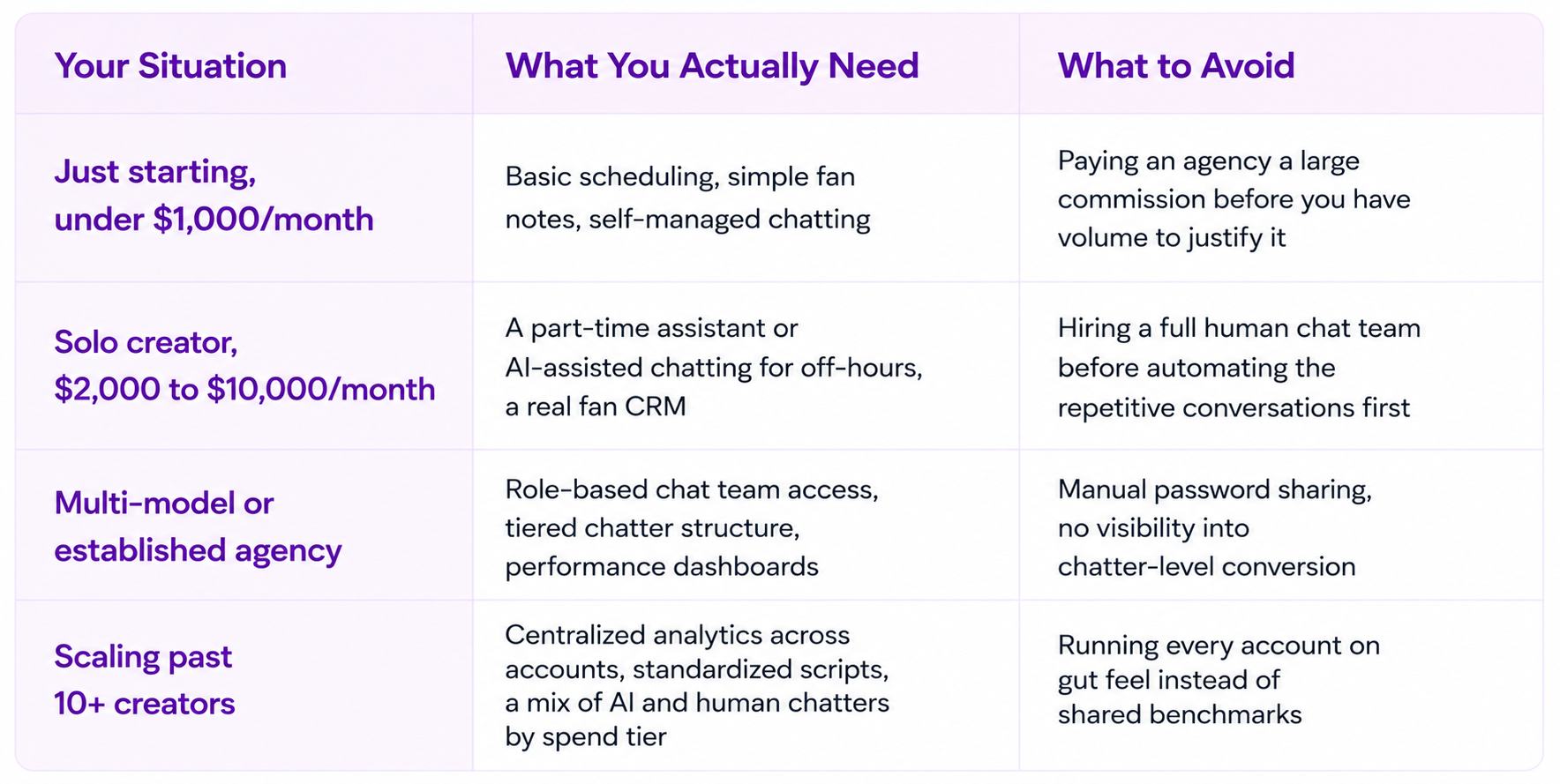
Compensation and Terms: What Management Actually Costs
Commission structures vary widely across the industry, and this is the part where creators most often get burned, either by paying too much for too little or by trusting numbers an agency can't actually back up. Broadly, agency commissions run from around 10% to 50% of gross revenue depending on how much of the work the agency takes on. A lower commission usually means the creator is still handling socials and content themselves, while a higher one usually includes full-service chatting, funneling, and account management combined.
Here's the part worth being blunt about: any agency or tool quoting you a specific revenue lift, like "we'll take you from $15,000 to $30,000 a month," should be able to show you where that number came from. Vague promises with no data behind them are a red flag, not a selling point. Ask what the number is based on, whether it's from a comparable account, and what happens if results land below it.
The same honesty applies to platforms and software. AI chatting tools and CRMs typically charge either a flat monthly fee, a per-message cost, a commission on AI-generated sales, or some combination of the three. Don't accept a pricing model you can't reconstruct with your own numbers. If a platform can't clearly explain what a typical month would cost you at your current volume, that's worth a second look before you commit. Supercreator's own plans and per-message costs are published for exactly this reason, so you can run the math yourself before signing up for anything.
Vetting an Agency Before You Sign
A few questions cut through most of the noise when you're evaluating a management agency. Ask how many creators each chatter handles, since an overloaded chatter means slower replies and generic conversations regardless of what the sales pitch says. Ask whether they can show anonymized performance data from existing accounts, not just testimonials, since testimonials are easy to write and hard to verify. And ask directly what happens to your account access if you decide to leave, since password-sharing arrangements can turn an exit into a security problem. If you're comparing agencies rather than building an in-house team, the OnlyFans agency directory is a reasonable place to start narrowing options.
Where Automation Fits Into Modern OnlyFans Management
The management model has shifted in the last couple of years, and the shift is mostly about coverage. Human chatters still handle the relationships that matter most, but more agencies and creators are beginning to incorporate AI chat assistants alongside human chatters to cover the volume a small team physically can't. Supercreator's Izzy AI can provide 24/7 coverage (when configured to do so) without gaps, and it handles qualifying conversations and lower-spend fans, so the humans on the team can focus on VIPs and custom requests instead of burning hours on small talk.
That same shift is why role-based access, chatter performance tracking, and a real fan CRM aren't optional anymore for anyone managing more than one or two accounts. Guessing which chatter is underperforming, or which fan tier is worth the most attention, is the kind of gap that live analytics on chatter activity and revenue close fast once you have them in place.
Signs You Need Management
Some signs are easy to miss because they show up gradually, not all at once. If two or three of these are true at once, that's usually the point where an account has outgrown doing everything solo.
- Your inbox is unmanageable. You're opening OnlyFans to hundreds of unread messages instead of a handful. That's not "busy"; that's structurally behind, and no amount of late nights fixes it on its own.
- Response times are slipping. Fans are waiting for hours instead of minutes for a reply, especially those actively trying to buy something. A fan ready to spend right now usually isn't still ready three hours from now.
- Posting has gotten inconsistent. A content calendar that used to be reliable now has gaps, or posts go out whenever there's time instead of on a schedule. Fans notice the silence before it shows up as a number you can point to.
- You can't track your top spenders anymore. Once you have more than a handful of regulars, keeping their spend history in your head stops working. If you can't name your five biggest spenders this month off the top of your head, you're probably treating a $500 fan the same as a $15 one.
- You're seriously considering your first chatter. This is usually the clearest signal. Before taking on the cost and overhead of a human hire, it's worth asking whether an AI assistant, like Supercreator, covering first replies and lower-spend fans could close that gap first.
Turning Management Into a System, Not a Guessing Game
Whether you're running your own account or managing a roster of ten, the operators who win aren't working harder than everyone else. They're running a system: clean chat coverage, secure team access, real performance numbers, and automation covering the volume a person alone can't. Supercreator brings those pieces together in one platform, from Izzy handling first replies and low-spend fans to role-based access that lets a chat team work without ever sharing a password, backed by analytics that show exactly where your revenue is coming from.
If you're managing your own account and want to see what AI-assisted chatting and a real fan CRM can do for your time, start free with Supercreator and connect your account in minutes. If you're running an agency and want to see how role-based access, chatter benchmarks, and Izzy work together across a full roster, book a demo and we'll walk you through it on your own numbers.
OnlyFans Management: How Top Creators and Agencies Run Their Accounts
But that system breaks the moment you add a second chatter, a second model, or more than a few dozen active fans. At that point, you need software built for the job, not a workaround. That's what an OnlyFans CRM is for.
This guide covers what an OnlyFans CRM actually does, what to check before you buy one, and how to match the right tier to where your account or agency is today.
What Is an OnlyFans CRM?
OnlyFans doesn't give creators or agencies a way to manage multiple chatters, track fan value, or automate replies. There's no built-in team dashboard and no fan history beyond a basic chat thread. A CRM (customer relationship management platform) fills that gap. It securely connects to your OnlyFans account and gives you a single place to view fan history, run chat tools, manage your team, and track revenue.
Here's why that fan history matters more than it sounds like it should: For many successful creators, PPVs, tips, and paid messages generate as much, or more, revenue than subscriptions. Your subscriber count isn't the real business. The DMs are. A CRM that only shows you subscriber numbers misses the bigger picture, and that's exactly what a chat-first CRM is built to fix.
What an OnlyFans CRM Should Actually Do
A CRM built for OnlyFans needs to cover four jobs well. Miss one of these and you'll end up patching together multiple tools with a spreadsheet again.
Fan History and Purchase Tracking
Every fan should have a profile: what they've bought, how much they've spent, what they responded to, and any tags your team has added. Without this, a new chatter picking up a conversation is starting without context, and blind chatters send the wrong offer to the wrong fan constantly.
Chat Automation and AI Chatter
This is where the CRM earns its keep on volume. AI chatter tools handle repetitive replies, bump messages, and win-back sequences so your human chatters aren't spending hours on fans who were never going to spend much. Supercreator's own data on chat activity across agency accounts puts a healthy messages-per-hour range at 50 to 70 for a human chatter. A CRM should surface that number automatically, not leave you counting messages by hand at the end of a shift.
Team and Access Management
If more than one person touches an account, you need role-based logins, not a shared password sitting in a group chat. Secure access management lets you add or remove chatters without ever handing over the actual OnlyFans credentials, which matters both for security and for keeping the account in your name, not a former employee's browser session.
Analytics and Revenue Reporting
You need to see revenue per chatter, per account, and per campaign in one dashboard. Analytics built for chatter management should show you where money is coming from and where a chatter is quietly underperforming, not just a top-line revenue number that hides both.
Comparison: What You Actually Need Depends on Your Setup
A solo creator and a 15-model agency are buying two different products, even if the software is the same. Here's how the priorities shift.
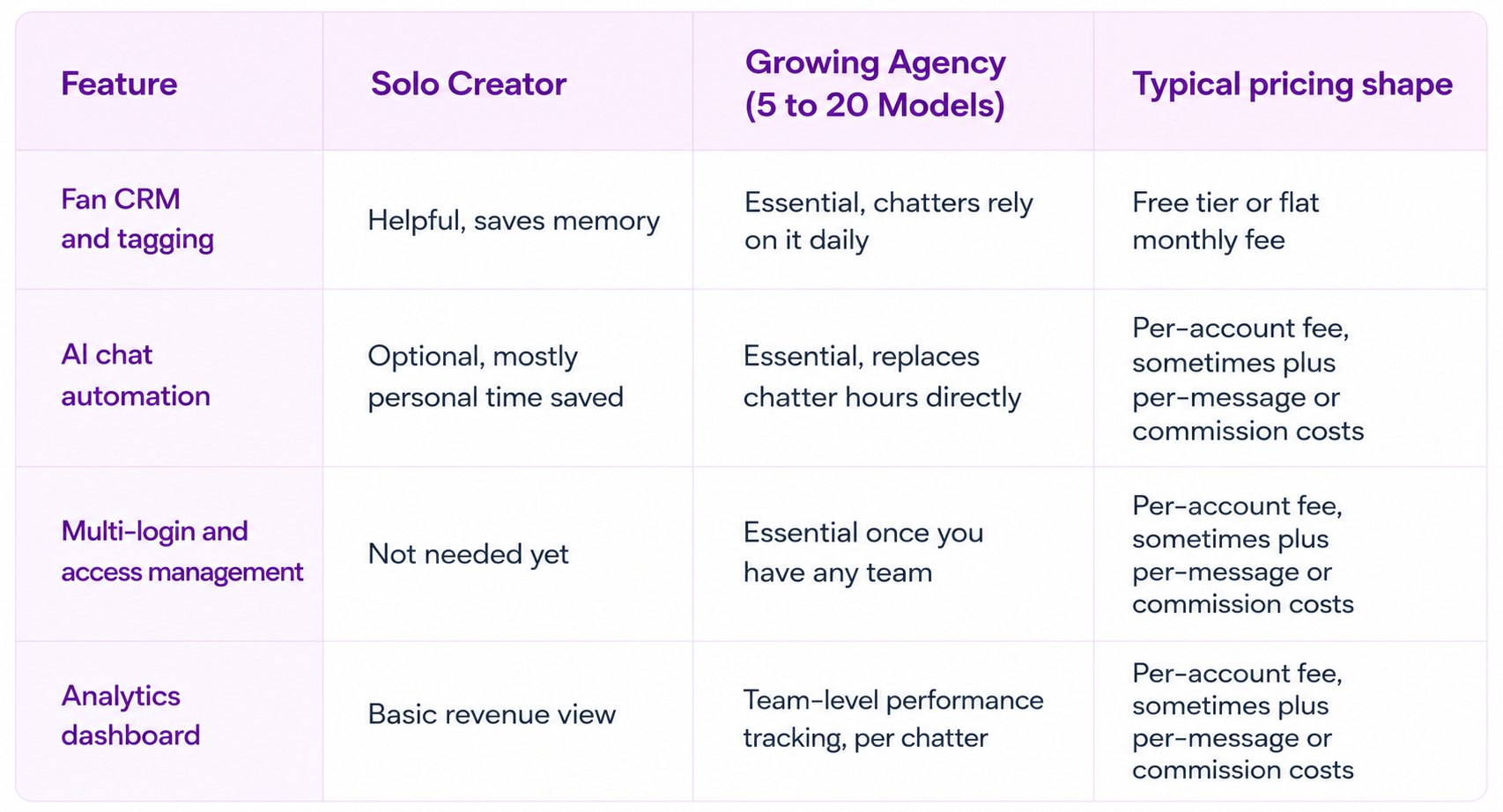
If you're solo, the CRM is mostly about not losing track of your own fans. If you're running a team, it's an operations tool first and a chat tool second.
How to Choose the Right OnlyFans CRM
So, how do you actually pick one? Run through these four questions before you commit.
Does it connect without asking for your password to be stored insecurely? A CRM should use secure, simulated access rather than storing your raw OnlyFans login. If a tool asks you to hand over credentials with no explanation of how they're protected, that's a red flag, not a minor inconvenience.
Does the pricing model match your volume? Some platforms charge per message sent plus a commission on AI-driven sales, on top of a base account fee. That model rewards efficiency at low volume, but here's the catch: as your message count climbs into the tens of thousands a month, per-message costs stack up fast, and a flat per-account fee can end up cheaper. Run the math on your actual monthly message volume before you assume the cheaper-looking plan stays cheaper.
Does it support your team's size today, not just where you'll be in a year? Buying enterprise-tier access management for a 2-person operation wastes money. Buying a tool that caps out at 3 accounts when you're already managing 8 wastes time migrating later.
Can you test it before committing? A free tier or trial period tells you fast whether the interface actually fits how your chatters work. If a platform won't let you try before you buy, ask why.
Common Mistakes When Buying an OnlyFans CRM
Picking based on price alone. The cheapest plan often locks the automation and analytics features you actually need behind a higher tier. Check what's included before comparing the sticker price.
Skipping access management until it's a problem. Agencies that start with shared logins usually add proper access controls only after a chatter has left but still has access to the account. Set this up before you need it, not after.
Ignoring the setup process. A CRM with a detailed fan bio, persona, and script setup takes real time to configure correctly. Rushing this step is the most common reason AI chatter performance disappoints early on. Budget a real afternoon for setup, not twenty minutes between chats.
Judging automation by day one results. Performance usually improves as you refine your persona, scripts, products, and automation settings. Judging it after 48 hours tells you almost nothing about how it performs after a month.
If you want platform-by-platform breakdowns rather than a buying framework, Top OnlyFans CRM Tools Compared for Agencies and Managers and Best OnlyFans CRM & Automation Tools for Sales and Engagement line up specific platforms feature by feature.
Final Words
An OnlyFans CRM isn't an optional add-on once you're managing more than a handful of fans or more than one chatter. It's the difference between guessing at what's working and actually seeing it. Start with what your setup needs today, not the feature list that sounds impressive, and the right tier follows naturally.
If you're running an agency and losing hours to shift schedules and shared logins, Supercreator's OnlyFans CRM puts your whole team, fan history, and revenue tracking in one dashboard, with Izzy handling the repetitive chat volume your team shouldn't have to.
- One dashboard for fan history, chats, and revenue across every model
- Role-based access so chatters never touch your real login
- AI chatter that picks up the repetitive conversations automatically
- Message Library for saving and reusing your best-performing scripts and PPVs
- Activity & Message Logs for full visibility into who did what, and when
- Auto-Translation so language never costs you a sale
- Fan Lists and Exclusion Lists to control exactly who gets automated and who doesn't
- Inbox Copilot to help your team draft faster replies without leaving the chat
Book a demo and see how it fits your operation.
If you're managing your own account solo, start on the free CRM Lite tier, no credit card required, and turn on AI chat automation whenever you're ready to hand off the repetitive replies.
OnlyFans CRM: What It Does and How to Choose One
.png)

