


.svg)
Decide Exactly How Your AI Chatter Works
When Izzy is on, how hard she sells, which fans she talks to, and when she stops and hands the chat to someone else. Every rule is a setting in the console, not a support ticket.


What you can measure
The hours she works
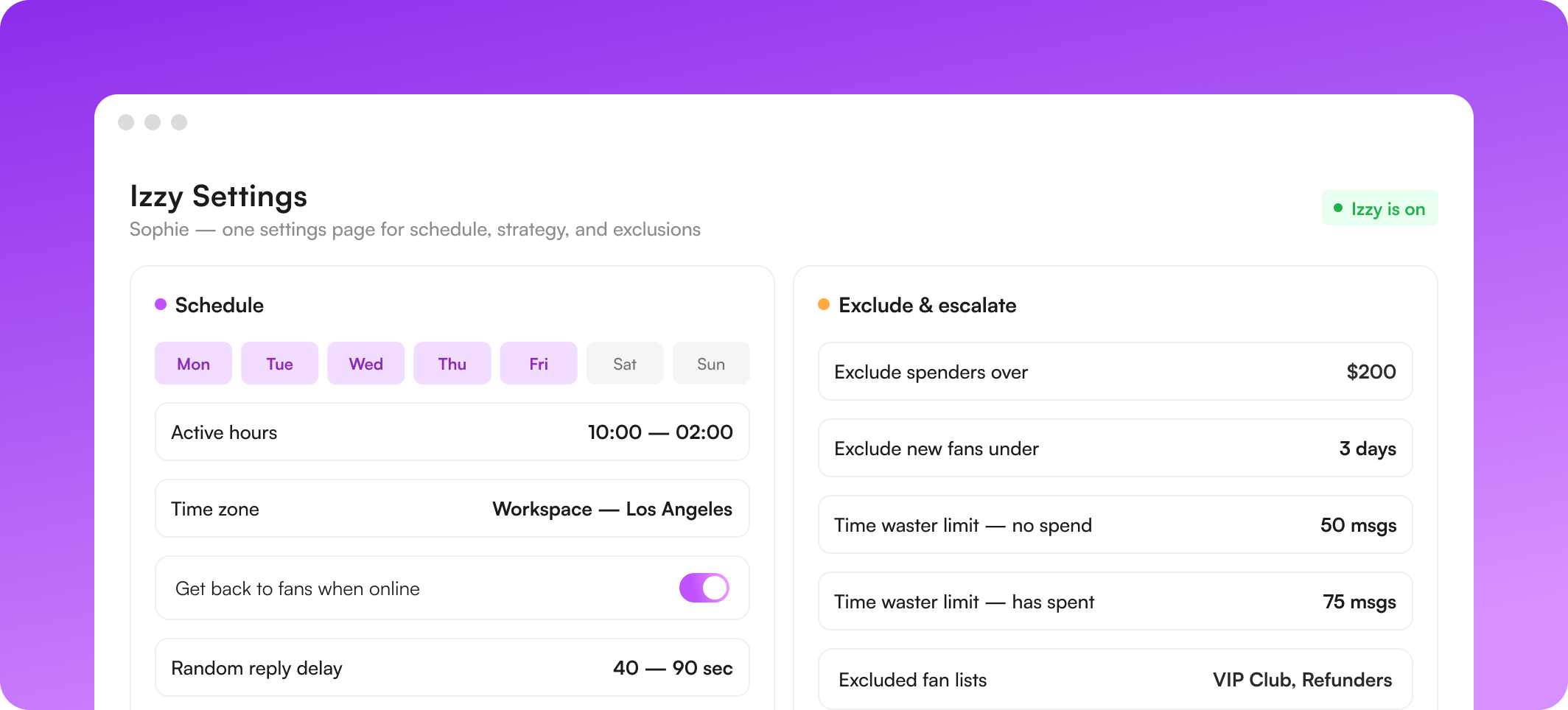
Give Izzy a schedule per day, and she runs only inside it. Scheduling follows the workspace time zone, then the creator bios, and falls back to Los Angeles. When her schedule flips back on, she rescans the inbox and replies to anything that came in while she was off.
.png)
How hard she sells
One dropdown moves Izzy from conservative to aggressive, changing how often she puts a PPV in front of a fan. Two further modes narrow her job entirely: rapport only, with no selling, or converting free-page fans to the VIP page. She still starts with accessible content and works upward as trust builds.
When she stops and hands over
Exclusion rules keep Izzy away from the fans you want handled personally: spenders over a threshold, brand-new subscribers, long-term VIPs, or any custom fan list. Beyond that, she escalates on her own: a custom request, an off-catalog ask, a fan questioning who they're talking to, or anything that breaks platform rules.
.png)
.png)
The automations that back her up
Bumps, expired-fan win-backs, and Message Flow sequences run on the same settings page and the same exclusion rules, so nothing double-messages a fan. An escalation from Izzy can itself start a flow, which means a handoff doesn't have to wait for a chatter to notice it.
What she's allowed to charge
Each product in the catalog carries a minimum price. Izzy can go above it when a fan is warm, never below, and prices are rounded up rather than landing on odd figures. Exclusivity levels from 1 to 5 tell her the order to work through your content as a conversation builds.
.png)
.png)
How fast you hand her the inbox
You don't have to switch her on for everything at once. Preview her conversations first, cap how many chats she takes while you read her output, and decide whether activating her should sweep up existing unread messages or start clean. Upvote and downvote individual messages, and she adjusts.
Which fan actions start a message
Pick the moments worth reacting to: a fan coming online, a purchase or tip, a like or comment on a post. A recency guard stops a bump from going out to anyone contacted in the last few hours, by Izzy or by a person, and unanswered bumps can unsend themselves so the thread never looks spammy.
.png)
.png)
The nudges that recover a dead thread
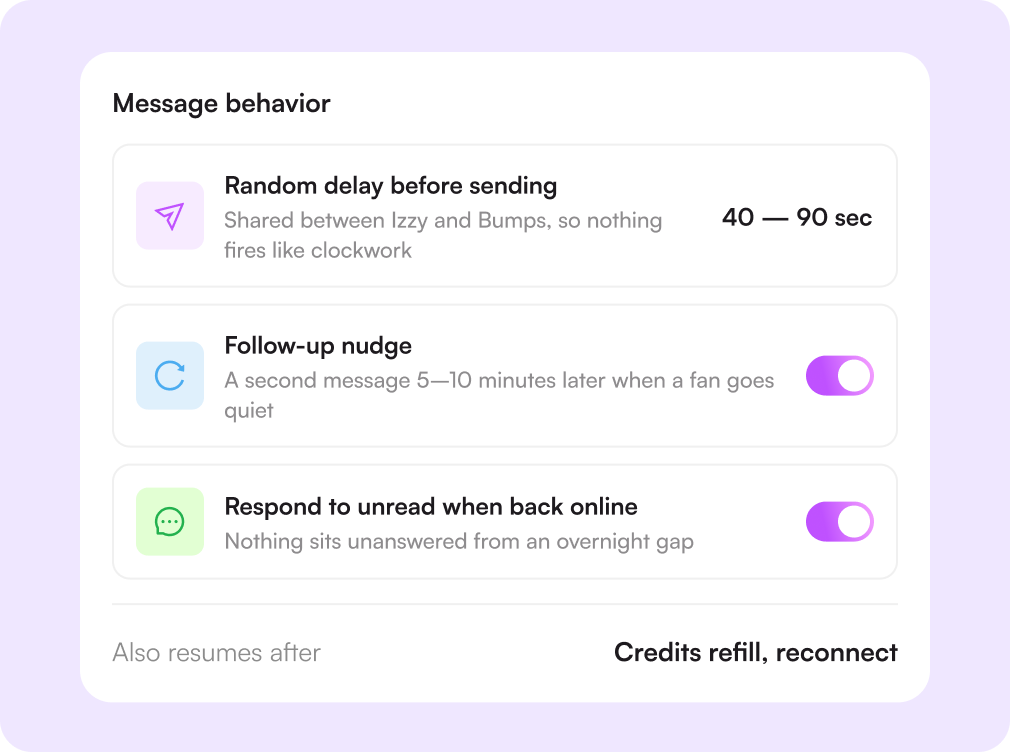
Silence after a PPV is where most revenue quietly disappears. Izzy sends a follow-up minutes later, and if the fan still says nothing, she can put a PPV in front of them, capped to the exclusivity level you're comfortable sending unprompted. Both timings are ranges, not fixed intervals.

Challenges solved by automation rules
An AI you can't steer is a risk
Every behavior is a setting
Hours, delays, sales pressure, exclusions, and escalation points are all yours to change, on your own, at any time.
Best fans are handled by a bot
Top spenders stay with people
Set a spend threshold, and Izzy steps aside, leaving your strongest chatters on the relationships that pay for the team.
Endless chats that never convert
Time wasters close themselves
Set a message limit per spend tier, and Izzy disengages in character when it's reached, or switch the rule off and manage it by list.
Forty accounts, forty configurations
Configure once, copy across
Tune one account, then apply it as a template to every other page in the same tier so rules don't drift.
How it works
Set her hours
Pick the days and hours Izzy runs, and the delay she waits before each message.
Choose a strategy
Conservative through aggressive, or a mode that only builds rapport or converts free fans.
Draw the lines
Exclude the fans and lists she shouldn't touch, and set the message limits per spend tier.
Adjust based on results
Watch messages, conversions, and revenue, then tighten or loosen any rule.
.webp)
Start Today
Start your 14-day free trial. Get set up in just 2 minutes and explore Supercreator's AI tools.
No Credit Card Required.
Book A Demo
Let us optimize your OnlyFans, and walk you through Supercreator.
Our experts won't bite ;)

Plans start from as low as $15/mo o
Find your individual rate on our pricing page
CRM Lite
Free CRM with all basic tools. Manage your chats, fans, and team management in one place.
AI Agent + CRM
Automate your chats. Save hours every day with an AI that replies, sells, and keeps fans engaged.
CRM Premium
Grow your OnlyFans with the best CRM, automations, and AI tools.
Frequently Asked Questions
Couldn't find an answer?

